Microsoft Word for iOS Gets Smarter with Copilot AI Assistant

Microsoft Brings AI-Powered Writing to iPhone Users

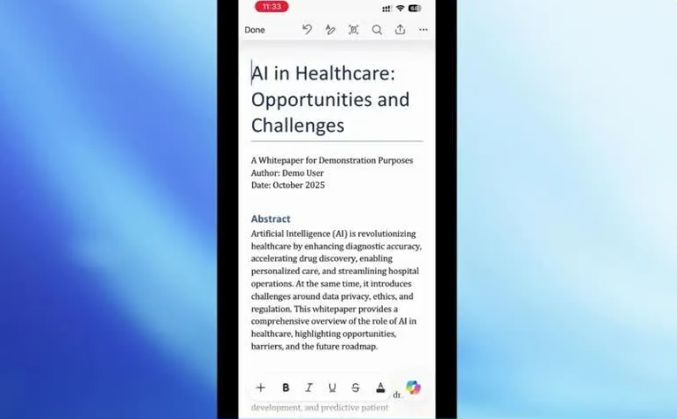
Apple device owners can now experience smarter document creation on the go. Microsoft recently announced it's testing a new Copilot AI feature in the iOS version of Word, currently available to Microsoft365Insider program members.
Image

Your Personal Writing Assistant

The updated app transforms how we create documents on mobile devices. Instead of staring at a blank screen, users with Copilot licenses can simply describe what they want to write. The AI then generates drafts or improves existing content based on these instructions.

Here's how it works:

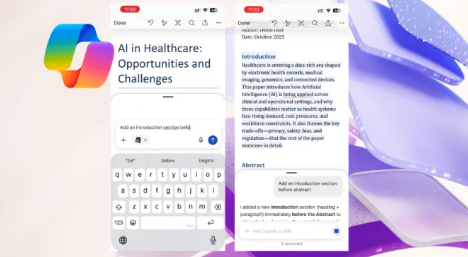
  • Talk to Write: Click the Copilot icon and type your ideas - the AI handles the heavy lifting
  • Smart References: Type "/" to quickly pull in relevant information from other materials
  • Instant Tweaks: Ask the AI to adjust tone, length or structure after content generation
Image

Built for Safe Collaboration

Microsoft has implemented several safeguards for team document work:

  • All AI suggestions appear in a preview window first - nothing changes until you approve it
  • Easy undo options protect against unwanted modifications
  • Version history lets you roll back changes if needed

Room for Improvement

The current test version has some limitations:

  • Can't create brand new documents from scratch yet - you need to start the file manually
  • No direct image generation within documents (requires switching to Copilot Chat)
  • Comment editing features still need refinement to prevent accidental deletions

The Bigger Picture

This update represents more than just new features - it's part of Microsoft's strategy to make AI an integral part of mobile productivity. As language models become more powerful, we're seeing them move from standalone tools to built-in assistants within our everyday apps.

The iOS Word update shows how artificial intelligence is becoming less about flashy demonstrations and more about practical help where we actually work - even on our phones.

Key Points:

  • Natural language commands replace manual typing for faster drafting
  • Strict approval process ensures users maintain control over changes
  • Mobile-first approach brings advanced AI tools to iPhone users first
Enjoyed this article?

Subscribe to our newsletter for the latest AI news, product reviews, and project recommendations delivered to your inbox weekly.

Weekly digestFree foreverUnsubscribe anytime

Related Articles

Google's Gemma 4: Small AI Models Pack a Big Punch
News

Google's Gemma 4: Small AI Models Pack a Big Punch

Google has open-sourced its Gemma 4 AI models, and they're turning heads in the tech world. What makes them special? Some of these compact models outperform giants 20 times their size, bringing powerful AI capabilities to everyday devices like smartphones. With optimized versions for mobile and IoT devices, Gemma 4 could change how we interact with AI in our daily lives.

April 7, 2026
AIMachine LearningGoogle
News

Chinese AI Models Dominate Global Rankings for Fifth Straight Week

China's AI models have outpaced global competitors for five consecutive weeks, with usage surging 31% to nearly 13 trillion tokens. Alibaba's Qwen3.6 Plus leads the pack, while American models trail far behind with just 3 trillion tokens processed. This growing gap highlights China's accelerating AI capabilities and expanding market share in the digital economy.

April 7, 2026
AIChinaTechMachineLearning
Microsoft's Superconductor Breakthrough Could Revolutionize Data Centers
News

Microsoft's Superconductor Breakthrough Could Revolutionize Data Centers

Microsoft is making waves with its high-temperature superconductivity technology that promises to transform how data centers handle power. By eliminating energy loss during transmission, these ultra-efficient cables could solve the growing power demands of AI infrastructure while reducing environmental impact. The tech giant has already begun real-world testing with partners, signaling a potential shift in how we power our digital future.

April 7, 2026
superconductorsMicrosoftdata centers
News

Microsoft Bets Big on Homegrown AI to Challenge Industry Leaders

Microsoft is making an aggressive push into developing its own AI models, aiming to compete head-to-head with OpenAI and Anthropic by 2027. The tech giant is investing heavily in computing power with NVIDIA's latest chips and has already seen promising results with a new speech transcription model. This strategic shift comes after Microsoft gained more independence from its partnership with OpenAI, signaling its ambition to become a leader rather than just an integrator of AI technology.

April 3, 2026
MicrosoftAI DevelopmentTech Competition
News

Microsoft Bets Big on Homegrown AI to Rival OpenAI by 2027

Microsoft is making a bold push into AI independence, aiming to develop its own cutting-edge models that can compete with industry leaders like OpenAI. The tech giant plans to achieve full autonomy within 3-5 years while continuing to support external partnerships. With massive investments in NVIDIA's latest chips and early success in voice transcription technology, Microsoft's move signals a potential shift in the AI power dynamics.

April 3, 2026
MicrosoftAI DevelopmentTech Competition
Gaode's ABot-M0 Gives Robots a Universal Brain
News

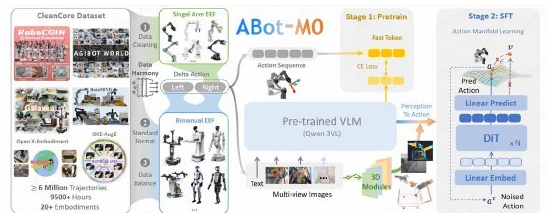
Gaode's ABot-M0 Gives Robots a Universal Brain

In a major leap for robotics, Gaode has open-sourced ABot-M0, the world's first unified architecture for robot intelligence. This 'universal brain' outperforms previous models by 30% on key benchmarks, while its complete open-source package—including algorithms and training data—could revolutionize how we develop smart robots for homes and industries.

April 1, 2026
roboticsAIopen-source