

Microsoft Enhances Notepad with Free AI Features
Microsoft Introduces AI Tools to Notepad
Microsoft has unveiled a significant update to its long-standing Notepad application, integrating AI-powered features designed to streamline text editing and enhance user productivity. The new tools—Summary, Writing, and Rewrite—are now available for testing by Windows Insiders and will soon roll out to all users with Copilot Plus computers.
Key Features Explained
The Summary tool allows users to quickly extract key points from lengthy documents, making it easier to digest complex information. The Writing feature assists in generating new content by offering suggestions and inspiration, while the Rewrite function provides alternative phrasing for existing text.
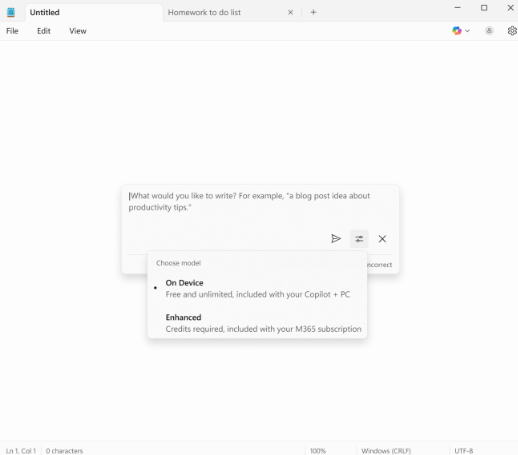
No Subscription Required
Unlike many of Microsoft's premium offerings, these AI features do not require a Microsoft 365 subscription. Instead, they leverage local models, ensuring fast performance without compromising privacy or requiring an internet connection.
Target Audience and Benefits
The update is particularly beneficial for professionals who frequently work with text, such as writers, editors, and researchers. By automating repetitive tasks like summarization and rewriting, Notepad’s new capabilities could save users significant time.
Microsoft’s Commitment to Innovation
This move underscores Microsoft’s dedication to integrating AI into its core products. Notepad, a staple since Windows 1.0 in 1985, is now poised to remain relevant in an era dominated by advanced text-editing tools.
Key Points:
- 🚀 Free AI Tools: Summary, Writing, and Rewrite features now available in Notepad.
- 💻 No Subscription Needed: Accessible on Copilot Plus PCs without Microsoft 365.
- 🔍 Local Processing: Uses on-device models for speed and privacy.
- 📝 Productivity Boost: Ideal for professionals handling large volumes of text.
