Microsoft Edge Tackles Tab Overload with Smart AI Sorting

Microsoft Edge Gets Smarter About Your Tab Chaos

We've all been there—dozens of browser tabs open, no idea where anything is, and that sinking feeling when you accidentally close the wrong window. Microsoft aims to solve this modern frustration with Edge's new AI Tab Organizer.
Image

How It Works

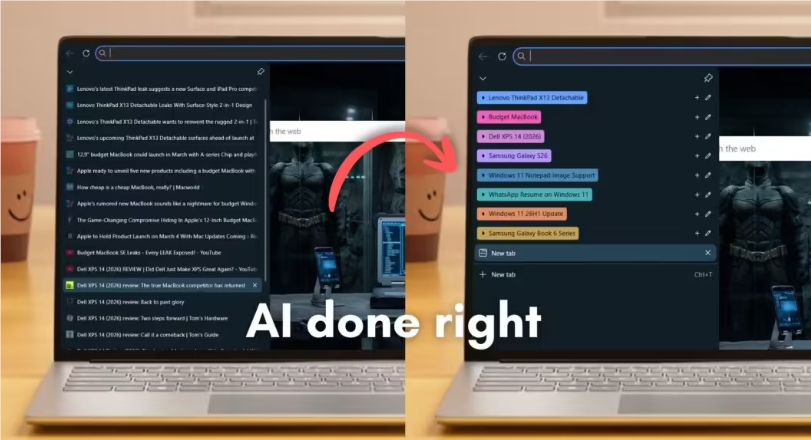
The system goes beyond simple title scanning. It actually understands what each page is about—whether it's product reviews, social media feeds, or research articles—then groups them intelligently. In testing, it organized 40 mixed-up tabs into logical categories in less time than it takes to blink.

What makes this stand out? The AI assigns helpful labels like "Tech Reviews" or "Vacation Planning" rather than generic terms. Each group gets its own color too, creating a visual map of your browsing session.

Real-World Performance

During stress tests with complex pages:

  • Similar products on different e-commerce sites were correctly separated
  • Video content was distinguished from written articles on the same topic
  • Research materials automatically grouped by subject matter The system maintains flexibility though—users can rename groups or change colors anytime.

Why This Matters

For researchers, developers, or anyone juggling multiple projects:

  • Saves time: No more manual tab sorting
  • Reduces stress: Visual organization helps mental clarity
  • Boosts productivity: Important resources stay accessible The feature works especially well with Edge's vertical tabs and allows one-click migration of groups to new windows.

While other browsers offer manual grouping, Edge's automated approach feels like stepping into the future. It's not perfect—some niche content might still confuse it—but for most users drowning in tabs, this could be a lifesaver.

Key Points:

  • Lightning-fast sorting: Organizes dozens of tabs instantly
  • 🎨 Smart labeling: Goes beyond basic categorization
  • 🔍 Deep understanding: Analyzes actual page content
  • 🖱️ User-friendly: Easy customization options
  • 🚀 Productivity boost: Especially helpful for professionals

Enjoyed this article?

Subscribe to our newsletter for the latest AI news, product reviews, and project recommendations delivered to your inbox weekly.

Weekly digestFree foreverUnsubscribe anytime

Related Articles

Microsoft's Edge Browser Gets Smarter with Outlook Integration
News

Microsoft's Edge Browser Gets Smarter with Outlook Integration

Microsoft is taking its AI assistant Copilot to the next level by weaving it deeper into everyday workflows. Soon, clicking links in Outlook emails will automatically activate Copilot in Edge's sidebar, providing instant summaries and action items. This clever integration aims to save users time by analyzing both email content and webpages simultaneously. While scheduled for May 2025, Microsoft cautions the timeline might shift as development continues.

February 26, 2026
MicrosoftAI ProductivityWorkplace Tech
News

Kimi AI Goes Global: Overseas Earnings Overtake Domestic Market

Moonshot AI's latest K2.5 model is making waves internationally, with overseas revenue now surpassing domestic income for the first time. The upgraded AI system has seen its global paid user base quadruple, climbing to third place on Openrouter's popularity rankings. Key innovations like native multimodal architecture and 'Agent Swarm' technology are driving this expansion, transforming Kimi from a simple chatbot into a powerful productivity tool.

February 3, 2026
AI ExpansionMoonshot AIKimi K2.5
News

Claude AI Builds Its Own Assistant Tool in Just 10 Days

Anthropic's AI assistant Claude has achieved a remarkable feat - developing its own productivity tool called Claude Cowork in just ten days. Designed as a user-friendly alternative to coding-heavy AI tools, it helps non-technical users automate office tasks like file organization and report generation. While promising greater efficiency, Anthropic cautions users about potential risks like unintended file deletions.

January 15, 2026
AI DevelopmentProductivity ToolsAnthropic
Vercel's New Tool Lets AI Actually Use Websites Like Humans
News

Vercel's New Tool Lets AI Actually Use Websites Like Humans

Vercel has unveiled Agent Browser, a breakthrough tool that enables AI models to interact with websites just like people do. Unlike traditional automation tools, it requires zero setup and works seamlessly with popular AI assistants. This innovation could transform how we automate online tasks, from form filling to price comparisons.

January 13, 2026
AI AutomationWeb DevelopmentProductivity Tools
ChatGPT Gets a Writing Makeover: Say Hello to Built-In Formatting Tools
News

ChatGPT Gets a Writing Makeover: Say Hello to Built-In Formatting Tools

OpenAI is rolling out a game-changing update to ChatGPT that eliminates the need for copy-pasting into Word docs. The new 'Formatting Blocks' feature automatically detects when you're writing emails or articles and provides rich text editing tools right in the chat interface. With intuitive formatting options like bold, italics, and lists, ChatGPT is transforming from a simple chat window into a powerful writing assistant.

December 26, 2025
ChatGPTAI WritingProductivity Tools
Chrome's AI Makeover: Smarter Search and Seamless Tab Collaboration
News

Chrome's AI Makeover: Smarter Search and Seamless Tab Collaboration

Google Chrome is getting a significant AI upgrade that transforms how we interact with the browser. The revamped search bar now acts as a powerful control center, letting users upload files and start complex searches directly. Even better, Chrome can now understand context between tabs - imagine asking it to summarize a webpage without switching tabs! These changes are rolling out across desktop and mobile, making Chrome feel less like a simple browser and more like an intelligent assistant.

December 22, 2025
Google ChromeAI FeaturesBrowser Updates