ChatGPT Gets a Writing Makeover: Say Hello to Built-In Formatting Tools
ChatGPT's New Formatting Superpowers
Gone are the days of wrestling with plain text outputs from ChatGPT. OpenAI has quietly introduced a revolutionary feature that's about to change how we interact with AI-generated content.
From Chatbot to Word Processor
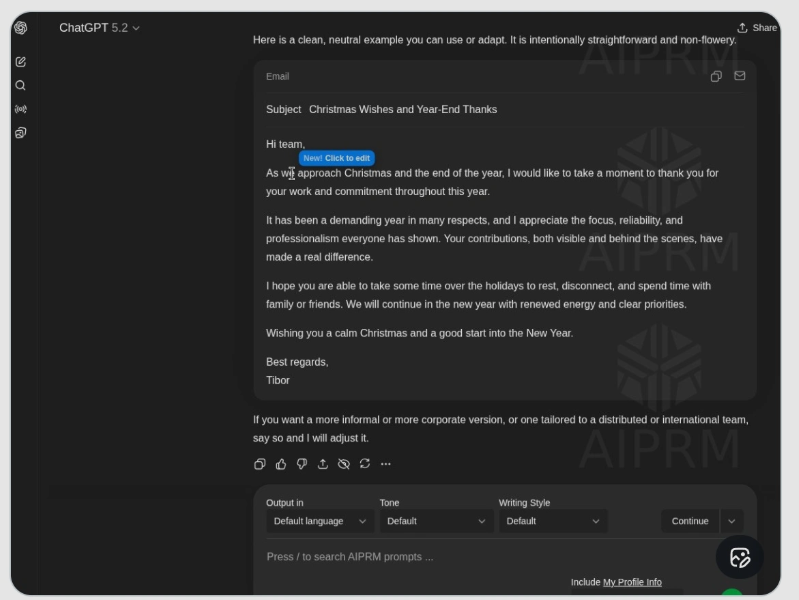
The new "Formatting Blocks" feature marks ChatGPT's evolution from conversation partner to full-fledged writing assistant. When the system detects you're drafting structured content like emails or articles, it automatically generates an interactive rich text box - complete with familiar formatting tools.
"This feels like ChatGPT just graduated from notepad to Microsoft Word," remarked one early tester. Highlight any text, and a mini toolbar appears offering:
- Text styling: Bold, italicize, or underline with one click
- Paragraph formatting: Create bullet points, numbered lists, or quote blocks effortlessly
- Layout options: Adjust alignment and indentation seamlessly
Why This Matters for Productivity
The update addresses one of ChatGPT's biggest pain points: the tedious "generate-copy-paste-format" workflow. Content creators and professionals who regularly use AI for drafting will notice immediate time savings.
"I write dozens of client emails weekly," shares marketing consultant Sarah Lin. "Having formatting tools built-in cuts my editing time in half."
The interface mimics mainstream editors like Gmail and Word intentionally - there's virtually no learning curve. This thoughtful design keeps users focused on their creative flow rather than wrestling with technical hurdles.
What's Coming Next?
The rollout is currently phased:
- Available first to Plus and Pro subscribers
- Will expand to all users gradually
- Future updates promise tables, code blocks, and image support
- Specialized templates (resumes, academic papers) coming soon
OpenAI appears committed to transforming ChatGPT into an all-in-one content creation hub rather than just a conversational AI.
Key Points:
- New rich text editing eliminates need for external word processors
- Formatting tools appear automatically based on content type
- Interface designed for zero learning curve
- Currently rolling out selectively before wider release
- More document features coming soon