Chrome's AI Makeover: Smarter Search and Seamless Tab Collaboration
Chrome's AI Evolution Takes a Big Leap
Google's latest Chrome update proves the browser is growing up - it's trading its simple search box for something far more sophisticated. The changes, currently in testing through Chrome Canary, reveal how deeply AI is being woven into our everyday browsing experience.
The Search Bar Gets Superpowers
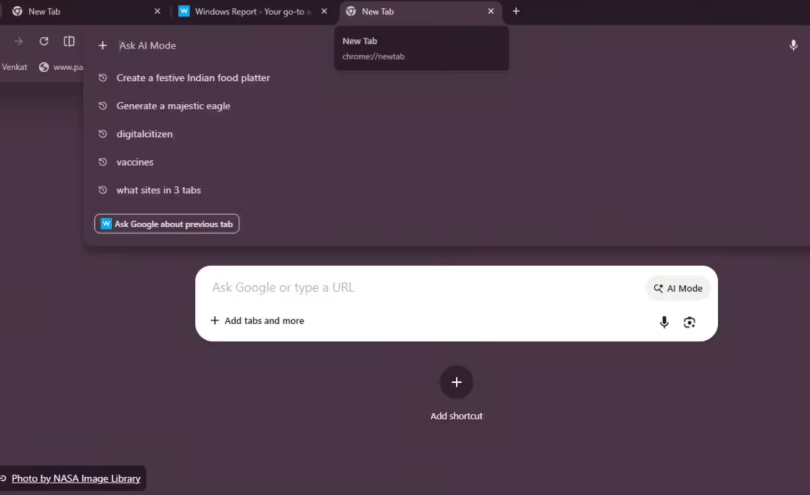
That little '+' icon in your search bar? It's about to become your new best friend. Gone are the days when it just sat there looking pretty. Now it's transformed into a full-fledged command center where you can:
- Upload images or files directly
- Launch complex searches without visiting specific websites
- Access deeper AI interactions right from a blank tab
"It's like having a concierge built into your browser," one tester remarked after trying the new features.
Context Is King
The real game-changer? Chrome's new ability to understand what you're working on across tabs. When you activate AI mode from the address bar, a smart panel pops up offering suggestions based on your previous tab's content. Need to summarize an article? Just ask - no more frantic tab-switching or copy-pasting marathons.
Android users aren't left out either. The mobile version now lets you attach recently visited tabs to your AI questions, keeping that seamless experience whether you're at your desk or on the go.
Subtle But Significant Visual Tweaks
Google didn't stop at functionality. They've replaced those confusing command URLs with a clear "AI mode" indicator - a small change that makes the technology feel more approachable. Together, these updates mark Chrome's transition from a passive information viewer to an active, intelligent partner in our digital lives.
Key Points:
- The '+' menu revolution: What was once decorative is now functional, supporting file uploads and deep searches with intuitive controls.
- Tab telepathy: Chrome's new context awareness eliminates tedious tab-hopping by understanding connections between your open pages.
- Universal upgrades: Android users get similar enhancements, ensuring consistent experiences across devices.