Google Chrome's New Feature Saves Your Favorite AI Prompts for One-Click Access

Chrome's Gemini Gets Smarter with New Skills Library

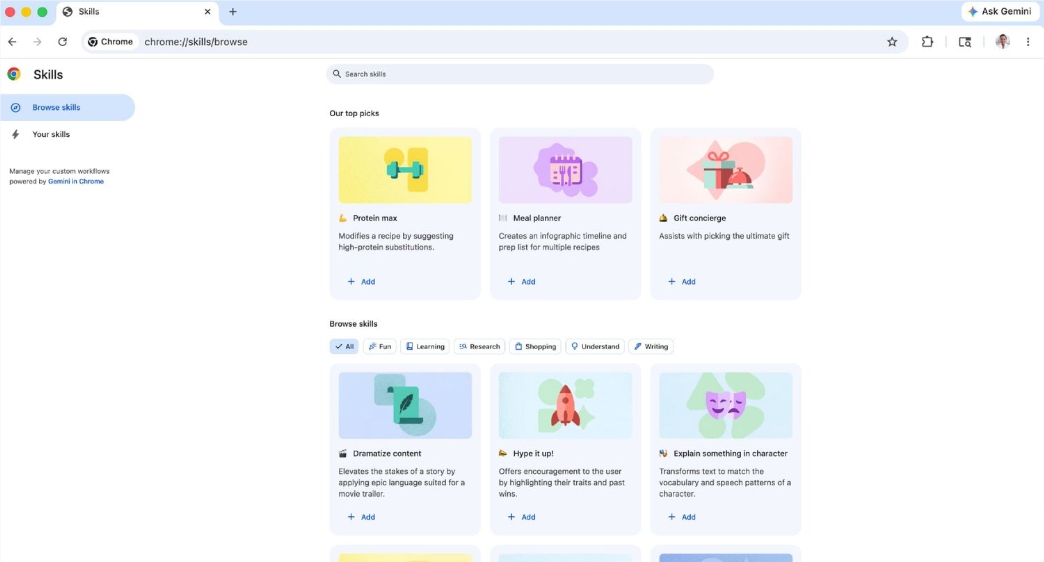
Google just made working with AI in Chrome significantly easier. The latest update introduces a 'Skills Library' for the built-in Gemini feature, transforming how users interact with artificial intelligence while browsing.
Image

From Repetitive Typing to One-Click Commands

Remember wasting time retyping the same AI prompts? Those days are over. The new library lets you save complex queries as reusable skills. Need to analyze product specs or extract document summaries? Just save it once, then trigger it with a simple slash command (/) or by clicking the plus icon.

What makes this truly powerful is its cross-tab functionality. Select multiple product pages and run your comparison skill simultaneously - no more copying and pasting between windows. Google even provides starter templates for common scenarios like health monitoring and productivity tasks.

Real-World Applications That Save Time

Imagine these scenarios:

  • Nutrition Tracking: Scan any recipe page to instantly calculate protein content
  • Smart Shopping: Automatically generate comparison tables across multiple product tabs
  • Work Efficiency: Extract key points from lengthy contracts with a single click

Google product manager Sarah Chen explains: "We're moving beyond simple chat interfaces. This turns Gemini into a personal assistant that remembers how you like to work."

Smart Safety Features

While automation brings convenience, Google hasn't overlooked security. The system includes important safeguards:

  • Confirmation prompts for actions like calendar updates or sending emails
  • Gradual rollout starting with English-language users before expanding globally

"We want to maintain user control while reducing friction," Chen added. "The confirmation steps ensure you're always in charge of important actions."

The Bigger Picture: Browsers Evolve

This update represents Google's broader vision of Chrome as more than just a window to the web. By deeply integrating AI capabilities, the browser becomes an intelligent platform that understands context and user needs.

Industry analyst Mark Thompson observes: "We're seeing browsers transform into operating systems for AI. Chrome's skills library moves us closer to truly personalized web experiences."

Key Points

  • Save Time: Convert frequently used prompts into reusable skills
  • Work Smarter: Apply skills across multiple tabs simultaneously
  • Built-in Templates: Starter skills for health, shopping, and productivity
  • Safety First: Confirmation steps protect against unwanted automation
  • Future-Ready: First step in turning browsers into AI platforms
Enjoyed this article?

Subscribe to our newsletter for the latest AI news, product reviews, and project recommendations delivered to your inbox weekly.

Weekly digestFree foreverUnsubscribe anytime

Related Articles

Tencent's QBotClaw Turns Your Browser into a Smart Assistant
News

Tencent's QBotClaw Turns Your Browser into a Smart Assistant

Tencent Cloud has introduced QBotClaw, a groundbreaking AI agent for QQ Browser that transforms it into an intelligent assistant. The tool requires no setup, supports custom models, and even allows remote control via WeChat. With precise page understanding and autonomous action capabilities, QBotClaw marks a significant step forward in browser technology.

April 9, 2026
AI AgentsTencentBrowser Technology
Microsoft Word's New AI Copilot Makes Writing on iPhone a Breeze
News

Microsoft Word's New AI Copilot Makes Writing on iPhone a Breeze

Microsoft just rolled out an exciting update for iPhone users - Word now has AI-powered writing assistance. The new Copilot feature lets you chat with AI to draft and edit documents naturally, like having a writing partner in your pocket. While it's still in testing with some limitations, this tool could change how we create documents on mobile devices. The feature includes safeguards for shared documents and offers practical tips to boost productivity.

April 7, 2026
Microsoft WordAI ProductivityMobile Tech
Tencent's WorkBuddy Now Lets You Control Your PC from WeChat
News

Tencent's WorkBuddy Now Lets You Control Your PC from WeChat

Tencent's AI assistant WorkBuddy just got a major upgrade, allowing users to remotely control their office computers through WeChat. The update introduces mobile voice commands, scheduled tasks, and enhanced security features. Whether you need to pull reports or draft documents, your AI assistant can now handle it anytime, anywhere - even offering 5,000 free credits for new users to try these features.

March 12, 2026
TencentAI ProductivityRemote Work
News

Google's Gemini AI Transforms Workspace Into Your Smart Office Partner

Google has taken workplace productivity to new heights by fully integrating its Gemini AI assistant across Workspace apps. From drafting documents in Docs to crunching numbers in Sheets and designing presentations in Slides, Gemini now acts as a digital colleague that understands context and adapts to your style. Early tests show it can boost spreadsheet efficiency by up to 9 times. Currently rolling out to premium subscribers, this upgrade marks a significant shift from tools that help you work to AI that works with you.

March 11, 2026
Google WorkspaceAI ProductivityDigital Transformation
News

Chrome's Secret AI Download Sparks Outrage Among Users

Windows users are discovering their storage space mysteriously vanishing, and the culprit appears to be Google Chrome. The browser has been silently installing a hefty 4GB AI model file without user consent, raising privacy and performance concerns. Security experts found the Gemini Nano model tucked away in system directories, set to automatically reinstall even when deleted. While Google remains silent, frustrated users share workarounds to reclaim their precious disk space.

March 5, 2026
Google ChromeAI ethicsuser privacy
Microsoft Edge's New AI Feature Tames Tab Chaos in Seconds
News

Microsoft Edge's New AI Feature Tames Tab Chaos in Seconds

Microsoft Edge has rolled out an AI-powered tab organizer that could be a game-changer for anyone drowning in browser tabs. The feature analyzes page content, groups similar tabs automatically, and even assigns color-coded labels—all in under a second during tests. For professionals juggling dozens of tabs, this might finally bring order to their digital workspace.

February 26, 2026
Microsoft EdgeBrowser FeaturesAI Productivity