Microsoft Edge's New AI Feature Tames Tab Chaos in Seconds
Microsoft Edge's AI Solution for Tab Overload
We've all been there—dozens of browser tabs open, no clear organization, and that sinking feeling when you need to find something quickly. Microsoft's latest Edge browser update aims to solve this modern productivity nightmare with artificial intelligence.
How It Works
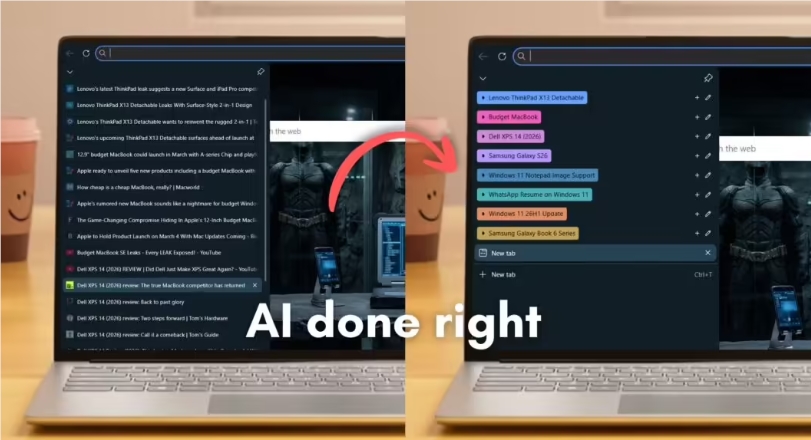
The new feature doesn't just scan tab titles—it actually understands what each page is about. During testing, it accurately categorized 40 messy tabs into logical groups in less time than it takes to blink. What's more impressive is how it handles nuance: when shown similar product pages from different e-commerce sites or multiple video tabs, the AI detected subtle differences and grouped them appropriately.
"It's like having a personal assistant for your browser," said one beta tester. "Instead of wasting time organizing tabs manually, the system does it instantly while I focus on actual work."
Smart Organization Features
The AI doesn't stop at basic grouping. It:
- Assigns precise category names (like "Tech Reviews" or "Travel Planning") instead of generic labels
- Uses color-coding for visual scanning
- Allows easy customization of group names and colors
- Supports one-click migration of tab groups to new windows
Microsoft kept the interface clean and functional—no flashy branding gets in the way of productivity. The feature works particularly well with Edge's vertical tabs layout, creating what might be the most organized browsing experience available today.
Why This Matters
For researchers, developers, and information workers who regularly have 20+ tabs open, this could save hours of frustration each week. While competitors offer manual tab grouping, Edge's automated approach represents a significant leap forward. Early users report it makes complex research projects and multi-tasking workflows noticeably smoother.
The feature is currently rolling out to Edge users worldwide as part of Microsoft's ongoing browser improvements.
Key Points:
- ⚡ Lightning-fast organization: Groups 40+ tabs in under a second
- 🎨 Smart labeling: Goes beyond basic categorization with precise names and colors
- 🛠️ Productivity focused: Clean interface without unnecessary branding clutter
- 🔄 Flexible workflow: Easily customize groups or move them between windows