Android 16 Gets Smarter: AI Summaries and Personalization Take Center Stage
Android 16 Update: Smarter Notifications and More Personal Touch
Google just flipped the script on how Android evolves. Instead of making users wait a full year for major updates, Android 16 features are rolling out progressively - starting with Pixel devices. This shift means your phone keeps improving without the traditional update drought.
Your Notifications Just Got an AI Makeover
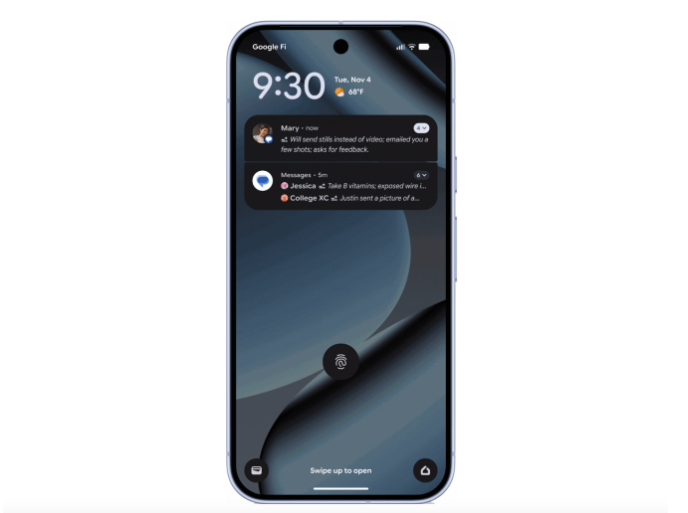
The star of this update? AI-powered notification summaries that act like a personal assistant for your lock screen. Overflowing group chats and lengthy messages now condense into bite-sized overviews. Meanwhile, the new "notification organizer" automatically tucks away less urgent alerts - goodbye spammy promotions and hello cleaner notifications.
Personalization Goes Deeper Than Ever
Android fans craving more control will love:
- Custom icon shapes that finally let you ditch the uniform look
- Themed icons that actually match your wallpaper
- Forced dark mode for stubborn apps refusing to join the dark side
The update also arms parents with granular screen time controls, including scheduled breaks and app-by-app usage limits - perfect for managing kids' device habits.
Communication Gets Contextual Clues
Ever missed an important call because you didn't know it was urgent? The experimental "Call Reason" feature lets contacts flag calls as "Emergency" - a tag that persists even if you can't pick up.
Video messages and social posts gain emotional context too with expressive subtitles. Tags like [Excited] or [Frustrated] appear when audio plays silently, helping you "hear" the tone without sound.
Practical Perks You'll Actually Use
The update solves some everyday headaches:
- Group chat escape routes: Get key details before joining unknown numbers' groups
- Desktop-style Chrome tabs: Never lose track of important pages again
- Enhanced circle search: Quickly verify if circled content might be scams
- Hands-free voice access: Just say "Hey Google" instead of fumbling for buttons
The Pixel Camera's Guided Frame now describes scenes in vivid detail (think: "a toddler hugging a golden retriever"), while new hearing aid compatibility makes Android more accessible than ever.
Key Points:
- 📲 AI Notification Summary: Turns message chaos into clear overviews
- 🎨 Deep Customization: From icon shapes to system-wide dark mode
- 👪 Parental Controls: Schedule screen time breaks and app limits
- 🔊 Expressive Subtitles: See emotions even when videos play silently
- 🆘 Emergency Call Tags: Never miss truly urgent calls again