Cursor 3 Launches: AI Agents Take the Wheel in Software Development
Cursor 3 Ushers in New Era of AI-Assisted Development
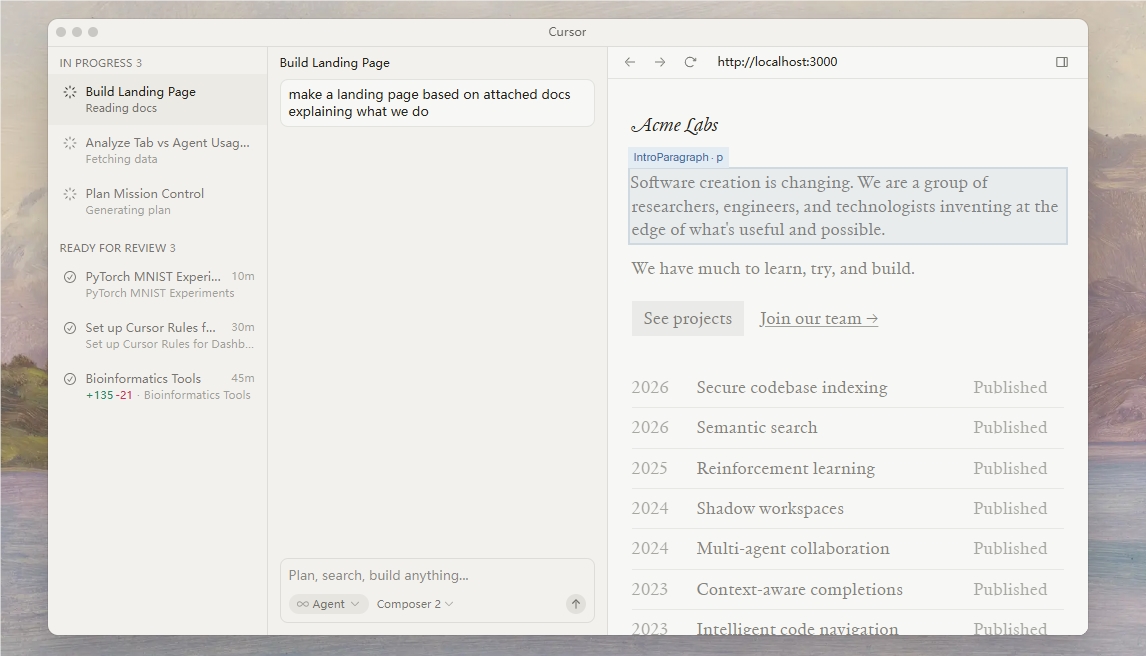
Software development just got smarter. The Cursor team has released Cursor 3, transforming the IDE from a coding tool into what they're calling an "agent-driven workspace." This isn't just another incremental update—it represents a fundamental shift in how developers interact with AI assistants.
The Agent-Centric Workspace
At the heart of Cursor 3 lies its revolutionary unified agent workspace. Imagine having a team of specialized AI assistants at your fingertips, each visible in a neatly organized sidebar. Whether you're working locally or in the cloud, these agents remain accessible across devices—from your smartphone to Slack channels.
"We're moving beyond simple code completion," explains the Cursor team. "Now developers can orchestrate multiple agents simultaneously, each handling different aspects of a project."
The system even generates visual progress reports, allowing developers to quickly verify an agent's work through automatically created screenshots and demonstrations.
Seamless Environment Switching
One standout feature addresses a common pain point: environment switching. Developers can now effortlessly move agent sessions between local machines and cloud servers. Need to run intensive tasks overnight? Push them to the cloud. Working on a plane? Switch back to local mode without missing a beat.
This flexibility means:
- Long-running processes continue uninterrupted
- Offline work remains productive
- Resource allocation becomes dynamic rather than fixed
Enhanced Collaboration Tools
The update brings significant improvements to team workflows:
- A streamlined difference viewer makes code reviews faster and more intuitive
- Full Language Server Protocol (LSP) support ensures compatibility with existing tools
- Built-in browser functionality reduces context switching
The interface retains Cursor's signature clean design while adding powerful new capabilities under the hood.
The Road Ahead
The Cursor team sees this as just the beginning. "Version 3 lays the foundation for truly autonomous coding agents," they note. Future updates will focus on creating self-managing code repositories and exploring new programming paradigms powered by these increasingly sophisticated AI collaborators.
For developers eager to try these features, upgrading is simple: just hit Cmd+Shift+P and open the new Agents Window.
Key Points:
- 🚀 Agent-driven development: Multiple AI assistants work simultaneously in unified workspace
- ☁️ Cloud/local flexibility: Seamlessly switch environments without losing progress
- 👥 Team-friendly features: Improved code review tools and multi-repository support
- 🔮 Future-ready: Platform designed for increasingly autonomous programming agents