Claude Code Goes Desktop: A Developer's New Best Friend
Anthropic Brings Claude Code to Desktop
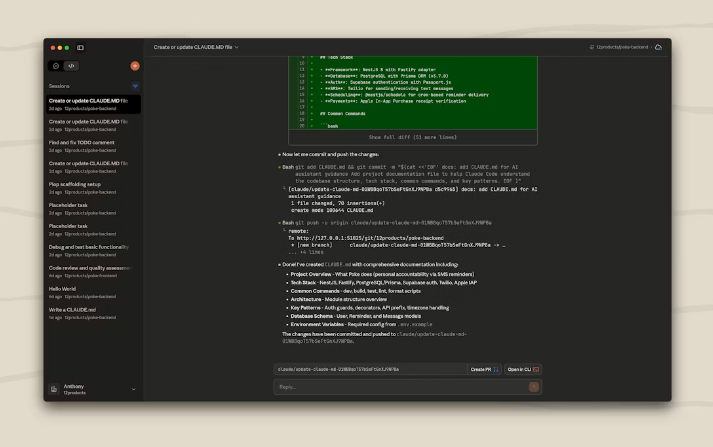
Developers rejoice - Anthropic's AI coding assistant just got a major upgrade. The company has rolled out a desktop preview version of Claude Code, swapping command lines for clickable buttons while packing some serious productivity boosts.
Work Smarter, Not Harder
The star of the show is multi-session parallelism. Imagine having multiple clones of yourself working on different project tasks simultaneously - that's essentially what Git Worktree technology enables here. Each session lives in its own isolated branch workspace (stored neatly in ~/.claude-worktrees), eliminating those "who changed what" moments that plague team projects.
"This isn't just about preventing conflicts," explains Mark R., a beta tester who works on complex fintech systems. "It's about maintaining flow state when context switching between features or bug fixes."
Seamless Integration Magic
The desktop version doesn't exist in isolation:
- Cloud Handshake: Start sessions on your laptop, continue on your phone - the web and desktop versions talk smoothly
- Environment Ready: It automatically grabs your system's
$PATH, sonpmand other tools work immediately out of the box (custom encrypted variables supported too) - Version Control: Updates happen quietly in the background without stepping on other Claude installations
Who Gets Left Out?
Currently, Windows ARM64 users will need to wait - support is limited to macOS and standard Windows architectures for now. But for most developers tired of juggling terminal windows, this release represents a significant leap toward making AI assistance feel native rather than bolted-on.
The evolution from chatbot to coding console appears complete.
Key Points:
- Desktop GUI brings visual polish to Claude Code's powerful AI assistance
- Git Worktree-powered sessions prevent code conflicts during parallel work
- Automatic environment sync means less setup, more coding
- Cloud integration maintains workflow continuity across devices
- Available now for macOS and Windows (non-ARM) users