Microsoft Copilot AI Enhances Workflow with Email-File Integration

Microsoft Copilot AI Introduces Seamless Email-File Integration

Microsoft has unveiled a significant upgrade to its Copilot AI assistant, enabling direct integration between emails and productivity applications such as Outlook and Gmail. This enhancement is designed to streamline workflows by allowing users to access and manage information more efficiently.

How the New Feature Works

The connector feature is optional, giving users control over which services they link. Through natural language prompts, Copilot can now search email content—such as summarizing project schedules sent by colleagues—reducing time spent on manual searches. For example, a user could request Copilot to "find all emails about Q4 budgets" and receive instant, organized results.

Expanded Document Creation Capabilities

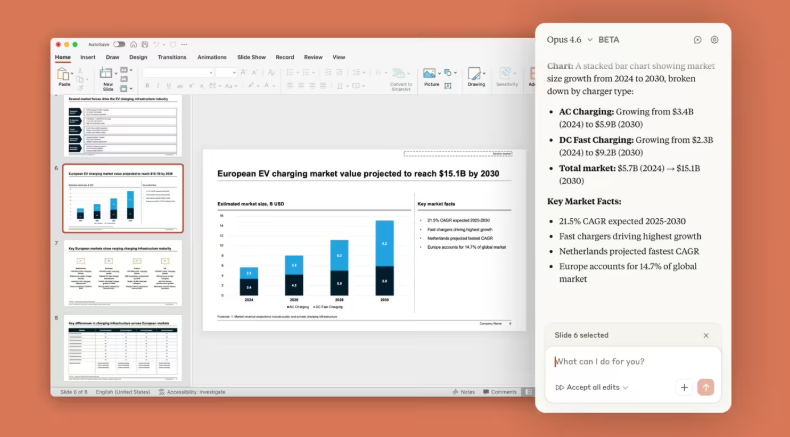
In addition to email integration, Microsoft announced that Copilot can now generate and export documents—including Word files, Excel spreadsheets, PDFs, and PowerPoint presentations—via simple text commands. This functionality allows users to transform ideas or data into editable formats effortlessly. For instance, a traveler could ask Copilot to "create a daily itinerary for my Tokyo trip" and export it directly as a shareable PowerPoint file.

Gradual Rollout Amid Growing Competition

The update is being phased in for members of Microsoft's Copilot Insider program, though availability may vary. This move comes as tech firms intensify efforts to embed AI deeper into workplace tools. Competitors like Perplexity have launched similar email assistants, while Microsoft's partnership with Anthropic aims to integrate advanced AI into its 365 suite.

Impact on Enterprise Productivity

For businesses, these features promise notable efficiency gains:

  • Reduced time spent on information retrieval
  • Faster document creation without switching applications
  • Improved collaboration through seamless file sharing

The upgrade reflects Microsoft's strategy to position Copilot as an indispensable tool for modern workplaces.

Key Points:

  • 🔗 Direct integration between Copilot and email platforms like Outlook/Gmail
  • 📂 Natural language commands for creating Word, Excel, PDF, and PowerPoint files
  • 🚀 Currently available to select users in the Insider program
  • ⏱️ Aims to cut administrative tasks by up to 50% according to internal estimates
Enjoyed this article?

Subscribe to our newsletter for the latest AI news, product reviews, and project recommendations delivered to your inbox weekly.

Weekly digestFree foreverUnsubscribe anytime

Related Articles

Tencent's WorkBuddy Now Lets You Control Your PC from WeChat
News

Tencent's WorkBuddy Now Lets You Control Your PC from WeChat

Tencent's AI assistant WorkBuddy just got a major upgrade, allowing users to remotely control their office computers through WeChat. The update introduces mobile voice commands, scheduled tasks, and enhanced security features. Whether you need to pull reports or draft documents, your AI assistant can now handle it anytime, anywhere - even offering 5,000 free credits for new users to try these features.

March 12, 2026
TencentAI ProductivityRemote Work
News

Google's Gemini AI Transforms Workspace Into Your Smart Office Partner

Google has taken workplace productivity to new heights by fully integrating its Gemini AI assistant across Workspace apps. From drafting documents in Docs to crunching numbers in Sheets and designing presentations in Slides, Gemini now acts as a digital colleague that understands context and adapts to your style. Early tests show it can boost spreadsheet efficiency by up to 9 times. Currently rolling out to premium subscribers, this upgrade marks a significant shift from tools that help you work to AI that works with you.

March 11, 2026
Google WorkspaceAI ProductivityDigital Transformation
Microsoft Edge's New AI Feature Tames Tab Chaos in Seconds
News

Microsoft Edge's New AI Feature Tames Tab Chaos in Seconds

Microsoft Edge has rolled out an AI-powered tab organizer that could be a game-changer for anyone drowning in browser tabs. The feature analyzes page content, groups similar tabs automatically, and even assigns color-coded labels—all in under a second during tests. For professionals juggling dozens of tabs, this might finally bring order to their digital workspace.

February 26, 2026
Microsoft EdgeBrowser FeaturesAI Productivity
Claude AI Now Works Inside Your Favorite Office Apps
News

Claude AI Now Works Inside Your Favorite Office Apps

Anthropic's new enterprise plugin brings Claude AI directly into Microsoft Office and Slack, eliminating tedious copy-paste workflows. The open-source system allows companies to customize AI assistants while avoiding vendor lock-in. Early adopters like Deloitte are already automating processes with seamless access to corporate data.

February 25, 2026
AnthropicAI ProductivityEnterprise Software
News

Honor Phones to Get Smarter Meeting Notes with New AI Feature

Honor is teaming up with AI specialist Plaud to bring native meeting transcription directly to its smartphones. The upcoming MagicOS update will transform the built-in voice recorder into an intelligent assistant that automatically generates polished meeting minutes. Office workers can finally ditch the tedious process of manual transcription - just hit record and let your phone handle the rest.

February 9, 2026
HonorAI ProductivityMeeting Technology
News

NVIDIA Engineers Triple Coding Output With Custom AI Tools

NVIDIA has equipped its entire engineering team of 30,000 with custom AI coding assistants, resulting in a dramatic 300% productivity boost. The chipmaker partnered with startup Anysphere to tailor development tools specifically for its complex hardware needs. While code production skyrocketed, quality remained stable - proving AI's growing role in technical workflows.

February 9, 2026
AI ProductivityNVIDIASoftware Development