ChatGPT rolls out group chats: Collaborate with up to 20 people and AI assistants
ChatGPT's New Group Feature Makes Collaboration Easier
OpenAI has officially opened ChatGPT's group chat feature to all users - whether they're on free accounts or paid tiers like Plus/Pro. This long-awaited functionality transforms ChatGPT from a solo experience into a collaborative workspace.
How It Works
Starting a group chat is simple: just click the "people" icon in the top-right corner of your chat window to generate an invitation link. Up to 20 participants can join across web and mobile devices, with conversations syncing in real-time.
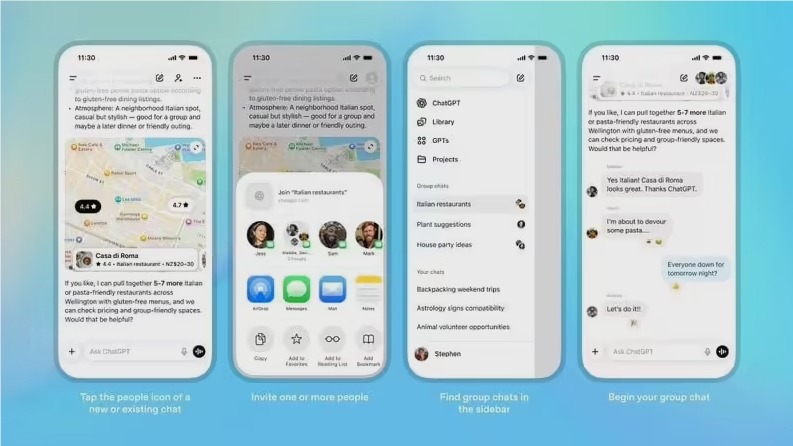
What makes this particularly interesting is how ChatGPT behaves in group settings. OpenAI engineers have taught the AI some social graces:
- It learns when to jump in naturally versus when to stay quiet
- Only responds when directly @mentioned (reducing unnecessary interruptions)
- Maintains context across multiple conversation threads
The system also respects privacy boundaries. While Personal Memory helps customize responses for the chat creator, these memories remain encrypted locally and aren't shared with other participants.
Practical Applications Abound
The potential uses are impressive:
- Planning: Coordinate weekend trips or dinner reservations with friends
- Creativity: Brainstorm garden designs or writing projects collaboratively
- Decision Making: Vote on restaurants or debate options with AI moderation
- Learning: Study groups can parse complex literature together
The temporary nature of these chats (messages auto-delete after 30 days) makes them ideal for sensitive discussions while maintaining privacy.
What's Coming Next?
OpenAI isn't stopping here. Based on user feedback, they plan to introduce:
- Chat history reviews
- Shared task lists
- Enterprise-grade "Team Rooms" (supporting up to 200 users)
The business version, slated for early 2026, will add admin controls and knowledge base integration - perfect for workplace collaboration.
The only current limitation? API calls and plugins still can't run simultaneously for multiple users - though shared links, images, and file reading work fine.
Key Points:
- Group size: Up to 20 participants
- Platforms: Works across web and mobile
- Privacy: Creator memories stay private
- Retention: Messages delete after 30 days
- Future plans: Task lists & enterprise versions coming soon