Solon Code CLI: A Smart Coding Companion for Java Developers
Solon Code CLI Revolutionizes Java Development
The Solon AI framework has unveiled its latest innovation - Solon Code CLI, bringing artificial intelligence directly to developers' terminals. This isn't just another coding tool; it's like having an experienced programmer whispering guidance as you work.
Smart Project Understanding Right From the Start
Imagine typing "init" and watching your project come alive before your eyes. That's exactly what Solon Code CLI delivers. The system swiftly scans your files, understands the architecture, and generates comprehensive documentation - all while you sip your coffee.
Finding Needles in Code Haystacks
Ever wasted hours searching for that one elusive function? Solon Code CLI changes the game with its intelligent search capabilities. Need code related to "server"? Just ask. The tool not only locates relevant segments instantly but serves them up with previews - like a helpful colleague pointing over your shoulder.
Safety Nets Built Into Your Workflow
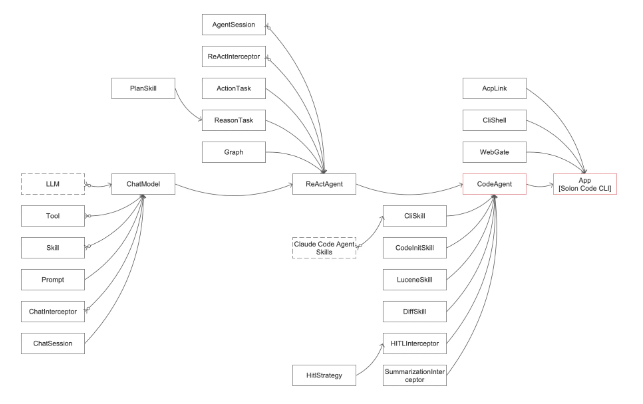
The tool takes "better safe than sorry" to heart with its validation-driven approach. Every code change gets automatically tested, while high-risk operations require explicit approval. It's like having a meticulous reviewer built into your development process.
Flexibility Where You Need It Most
Whether you prefer command line purism or visual interfaces, Solon Code CLI adapts seamlessly:
- CLI mode keeps things streamlined for terminal enthusiasts
- Web interface offers visual interaction options
- ACP integration bridges the gap with popular IDEs
The result? A tool that works as comfortably with Java backend development as it does with Node.js frontend projects.
For developers tired of wrestling with complex tools or digging through endless documentation, Solon Code CLI might just be the productivity boost they've been waiting for.
Key Points:
- 🌟 Multi-stack compatibility: Works across different technologies while automatically documenting projects
- 🔍 Intelligent search: Finds code segments faster than traditional methods
- 🔒 Safety first: Validates changes and requires confirmation for risky operations