Google's New Windows AI App Lets You Search with Just Two Keystrokes
Google Brings AI Search to Your Windows Desktop
In a move that could change how we interact with our computers, Google has unveiled its new 'Google app for desktop' for Windows users. This isn't just another search bar - it's a full-featured AI assistant that lives on your desktop, ready to help with just two keystrokes.
Lightning-Fast Search at Your Fingertips
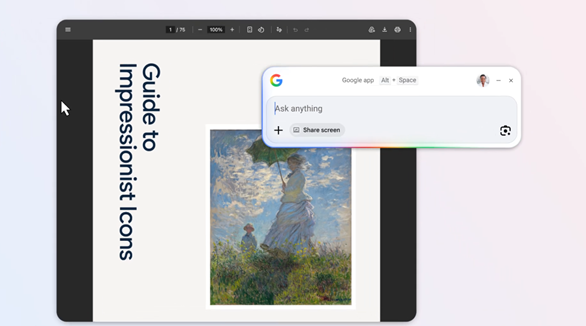
Forget opening a browser. The real magic happens when you press Alt+Space - instantly summoning a search interface powered by Google's Gemini AI technology. Need to find that document you saved last week? Looking up a quick fact? The app searches across the web, your local files, installed applications, and even your Google Drive simultaneously.
"This transforms how users access information," explains tech analyst Mark Reynolds. "It removes the friction of switching between apps and browser tabs - your computer essentially becomes one big search box."
More Than Just Web Search
The application packs several clever features:
- Google Lens integration lets you select any on-screen content for instant analysis - translate foreign text in images, solve math problems from screenshots, or identify objects
- Screen sharing tools allow asking questions about specific windows or your entire display
- Deep local search finds files and applications faster than Windows' native search
The AI Desktop Wars Heat Up
Currently available for Windows 10 and above (English only), Google is already working on a macOS version. This positions them directly against other AI desktop clients like OpenAI's ChatGPT and Anthropic's Claude.
Early adopters report the app shaves seconds off every search - which adds up quickly throughout the workday. "It's like having a supercharged version of the Windows search bar," says beta tester Sarah Chen. "I use it dozens of times daily without thinking."
Key Points
- Instant access: Press Alt+Space anywhere to search
- Search everywhere: Web, local files, apps, and Google Drive
- Visual search: Google Lens integration for images and screenshots
- Coming soon: macOS version in development
- Current limitation: English interface only, no Chinese support yet