Google Gemini Beta Unveils Smarter Image Editing with Markup Magic
Google's Gemini Gets Precision Editing Powers
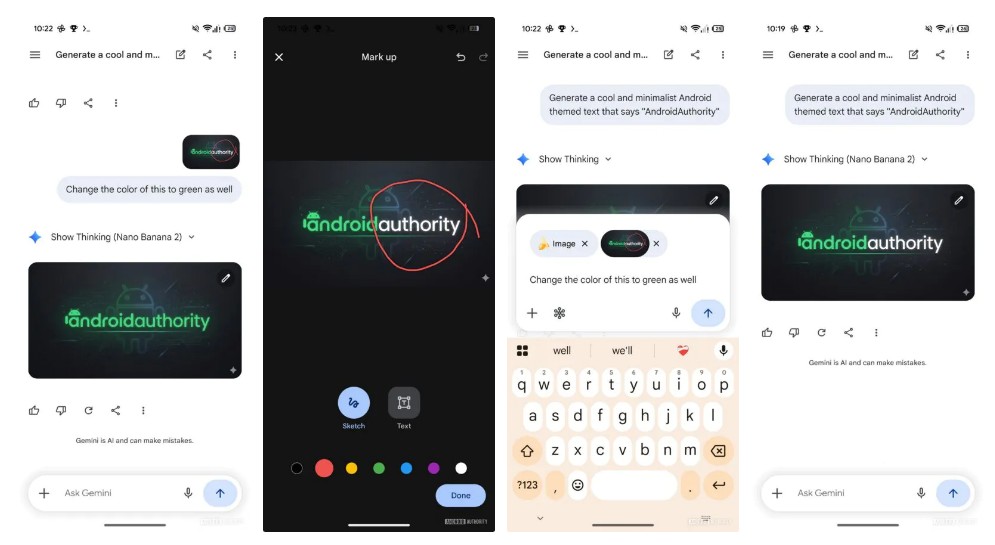
Google is giving its Gemini AI app some serious editing chops in a new beta release. The 17.10.54.sa.arm64 version introduces an innovative markup system that could change how we tweak AI-generated images on our phones.
Two-Way Communication with Your AI Editor
The standout feature? A clever combination of visual annotations and text instructions. Forget the clunky back-and-forth of previous versions - now you can simply:
- Draw directly on the image to highlight areas needing changes
- Type your request in a new text box that appears alongside
- See immediate results without leaving the editing interface
"This solves one of the biggest frustrations with AI image tools," explains digital artist Mia Chen, who tested early versions. "Before, you'd describe what you wanted, get something close but not quite right, then struggle to explain how to fix just one part."
From Sketchpad to Full Editing Suite
The beta shows Google's ambitions extend beyond simple image generation. Reserved spaces for resizing and effects options hint at plans to evolve Gemini into a complete mobile editing workstation. It's a smart move as the AI race shifts from "who can create the wildest images" to "who offers the most precise control."
Industry watchers note this could give Google an edge in mobile creative workflows. While competitors focus on standalone web apps, Gemini's tight integration with Android devices might appeal to photographers and content creators who want powerful tools without switching between applications.
What This Means for Creators
The implications go beyond convenience:
- Faster iterations - Make specific changes without regenerating entire images
- More control - Target exactly which elements need adjustment
- Professional potential - Moves AI tools closer to being viable for serious creative work
Though still in testing, these features demonstrate how multimodal AI is maturing. Instead of guessing what users want, systems like Gemini are learning to understand nuanced visual instructions - a crucial step toward professional adoption.
Key Points:
- New markup interface allows direct image annotation combined with text instructions
- Real-time editing workflow eliminates need to exit and re-enter editing modes
- Reserved tool spaces suggest future expansion into full editing suite capabilities
- Mobile-first approach could differentiate Gemini from web-based competitors