Cursor 3 Ushers in a New Era of AI-Assisted Coding
Cursor 3 Revolutionizes Developer Workflows with AI Agents
The coding world just got a major upgrade. Cursor has launched version 3 of its popular IDE, transforming how developers work with AI assistants. This isn't just another incremental update - it's reshaping the very nature of programmer-AI collaboration.
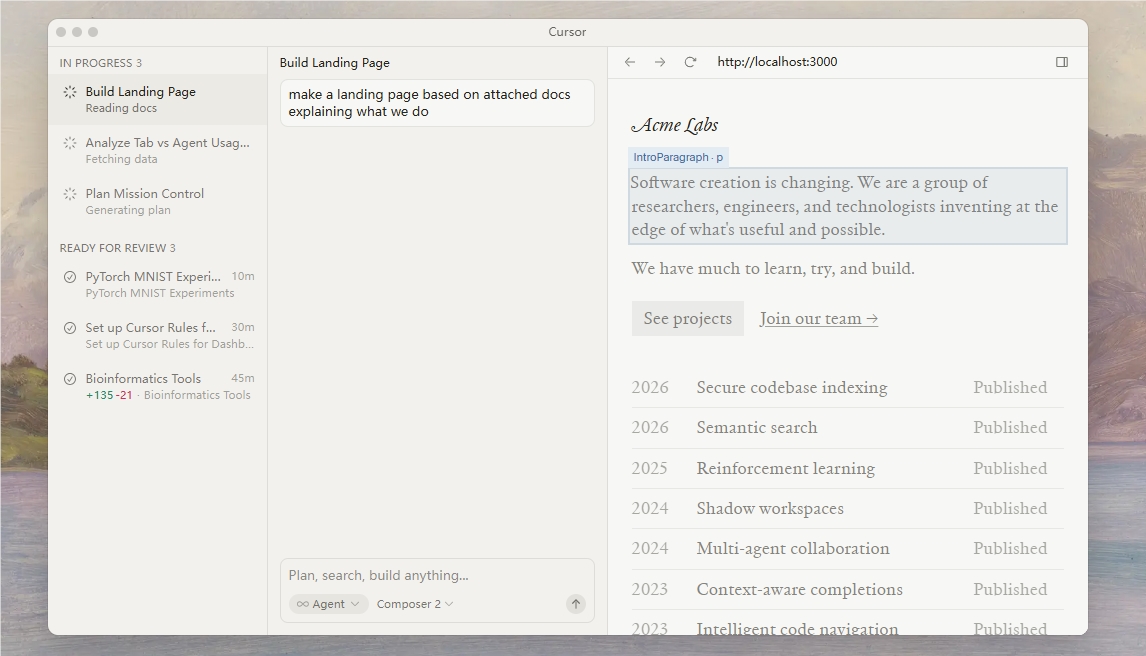
A Unified Home for Your Coding Assistants
At the heart of Cursor 3 lies its groundbreaking "unified agent workspace." Imagine having your entire team of AI assistants organized neatly in one place, whether they're running on your laptop or in the cloud. The new sidebar interface makes managing multiple agents as easy as browsing your email inbox.
"We're moving beyond simple chatbots that answer questions," explains the Cursor team. "These are full-fledged collaborators that can demonstrate their work visually through screenshots and live demos."
Work Without Boundaries
Cursor 3 removes the traditional barriers between local and cloud environments. Need to switch contexts? Just transfer your agent session seamlessly. This means:
- Continuous productivity: Start a complex task on your office computer and pick it up later on your phone during your commute
- Offline flexibility: Keep working even without internet access, then sync up when you're back online
- Resource optimization: Hand off demanding computations to cloud agents while keeping lightweight tasks local
The difference view interface has also received a major facelift, making code reviews faster and more intuitive than ever before.
The Future of Programming?
While maintaining all the features developers love - full LSP support, built-in browser functionality, and extensive plugin compatibility - Cursor 3 sets its sights on more ambitious goals. The team envisions self-maintaining codebases where AI agents handle routine updates and optimizations autonomously.
"This is just the beginning," says a company spokesperson. "We're laying the groundwork for programming models we can't even imagine yet."
Developers can experience these changes immediately by upgrading and accessing the new Agents Window (Cmd+Shift+P). As coding enters this new era of AI collaboration, one thing's clear: the way we write software will never be the same.
Key Points:
- AI collaboration redefined: Multiple agents work together in a unified workspace
- Environment fluidity: Switch effortlessly between local and cloud computing
- Smarter reviews: Enhanced difference view streamlines code collaboration
- Future-ready: Platform designed for increasingly autonomous coding assistants