Cursor 3 Launches: AI Agents Take the Wheel in Software Development
Cursor 3 Ushers in Era of AI-Driven Development
The software development landscape just got more interesting with the launch of Cursor 3, an IDE update that puts artificial intelligence front and center. Moving beyond simple code suggestions, this version introduces what the team calls "agent autonomy" - where AI assistants take on more independent roles in the coding process.
A Workspace Built for AI Collaboration
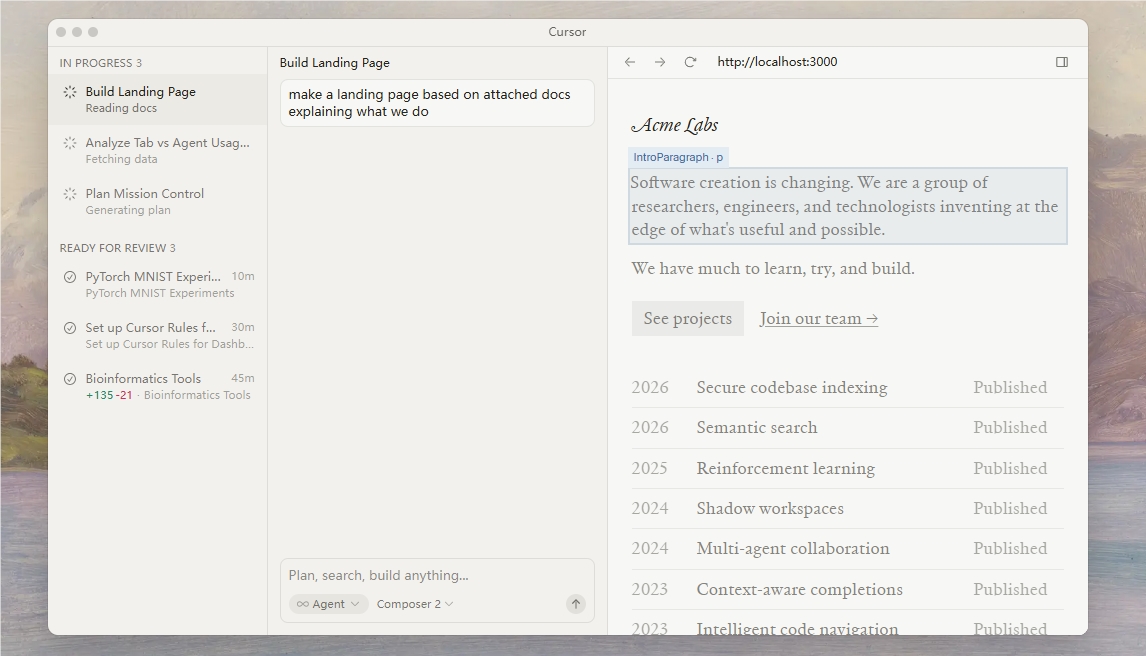
At the heart of Cursor 3 is its innovative unified workspace design. Imagine having a team of digital assistants at your fingertips - that's essentially what this update delivers. Developers can now interact with multiple AI agents simultaneously, all neatly organized in a sidebar interface. Whether you're working locally or in the cloud, these agents remain accessible across devices including smartphones, web browsers, and even Slack.
What makes this particularly useful? Cloud-based agents can generate visual demonstrations of their work, complete with screenshots. This means you don't need to dig through lines of code to understand what changes an agent has made - you can see them presented clearly.
Flexibility Where It Counts
One standout feature is the effortless switching between local and cloud environments. Need to run intensive tasks without draining your laptop battery? Shift them to the cloud. Going offline but want to keep working? Move everything back to your local machine. This flexibility ensures developers can maintain productivity regardless of their internet connection or hardware limitations.
The update also brings smarter tools for team collaboration. A redesigned difference view makes code changes easier to spot and review, potentially saving hours during debugging sessions. For those worried about losing familiar features, rest assured - Cursor 3 maintains support for Language Server Protocol (LSP), built-in browsing, and all your favorite plugins.
The Road Ahead for AI-Assisted Coding
The Cursor team sees this release as just the beginning. "We're laying the foundation for truly autonomous coding assistants," explained a company representative. Future updates promise even more advanced capabilities, potentially leading to self-maintaining codebases where AI handles routine updates and optimizations.
For developers eager to try these new features, upgrading is simple: just open Cursor and enter Cmd+Shift+P -> Agents Window to access the new interface.
Key Points:
- Agent autonomy arrives: Cursor 3 shifts from human-computer collaboration to agent-driven workflows
- Cross-environment flexibility: Seamlessly switch between local and cloud-based AI assistants
- Visual feedback: Cloud agents now generate demonstrations with screenshots
- Team-friendly tools: Improved difference view speeds up code reviews
- Future-ready: Platform designed for increasingly autonomous coding assistance