Cursor 3 Launches: AI Agents Take the Wheel in Software Development
Cursor 3 Revolutionizes Coding with AI Agents
Software development just got smarter. The Cursor team's latest release transforms how developers work with artificial intelligence, moving beyond simple assistance to true agent autonomy.
A Workspace That Thinks With You
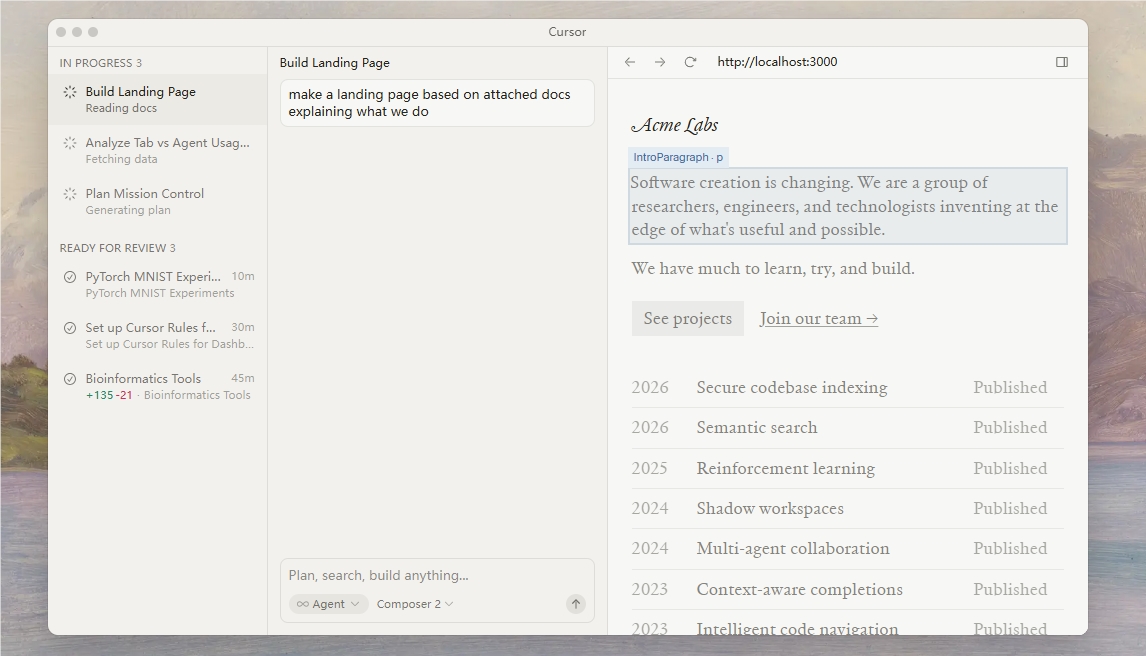
Cursor 3's standout feature is its unified agent workspace, a first-of-its-kind environment where multiple AI assistants collaborate side by side. Imagine having an entire team of specialized coding experts at your fingertips - that's what the new sidebar interface delivers.
"We're seeing developers launch agents from everywhere - their phones during commutes, web browsers in coffee shops, even Slack messages," explains lead designer Mark Chen. "The cloud agents can even show their work visually through screenshots and demos, so you always know exactly what's happening."
Seamless Switching Between Worlds
The update eliminates the old boundaries between local and cloud development:
- Start a complex build process on your office workstation
- Review the results later from your tablet at home
- Make quick edits on your phone during lunch
- All without losing context or progress
"It's like having a persistent coding session that follows you everywhere," says early adopter Sarah Kim, a full-stack developer. "I can run intensive tasks overnight in the cloud but still tweak things locally when I'm offline on the subway."
Sharper Tools for Teamwork
Cursor 3 doesn't just improve solo work - it supercharges collaboration:
- Redesigned diff viewer makes code changes crystal clear
- Multi-repository support connects projects like never before
- Existing IDE strengths remain (full LSP support, built-in browser)
The team promises this is just the beginning. "We're building toward self-managing codebases," reveals CTO Elena Rodriguez. "Imagine repositories that can debug themselves or suggest architectural improvements proactively."
Try It Yourself
Ready to experience the future of coding? Update Cursor and open the Agents Window (Cmd+Shift+P). Just be prepared - your development workflow might never be the same.
Key Points:
- Agent autonomy takes center stage in Cursor 3's unified workspace
- Cloud/local flexibility lets developers work anywhere without interruption
- Enhanced collaboration tools streamline team code reviews
- The foundation for more autonomous coding environments