Claude's New Remote Coding Feature Turns Phones into Portable Dev Terminals

Claude Bridges Desktop and Mobile Coding Worlds
Image

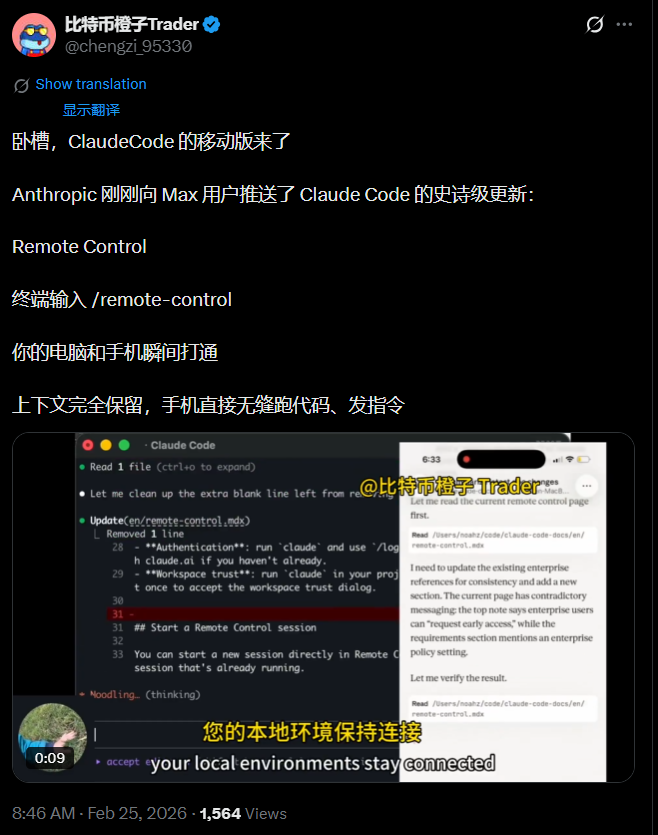
Anthropic has just rolled out what might be every developer's new favorite feature: remote terminal control through Claude Code. Forget awkward phone coding—this lets you start projects on your computer and effortlessly continue them anywhere via smartphone.

How It Works

The magic happens with a simple /remote-control command (or /rc shortcut). Type this in your active Claude terminal session, and you'll get:

  • A unique connection link
  • QR code for instant pairing

Scan with your Claude mobile app (iOS/Android) or visit claude.ai/code, and voilà—your phone becomes a terminal remote. Crucially, all processing stays on your local machine; your device merely mirrors the session.

Why developers are excited:

  • No context switching between devices
  • Full access to local filesystems and custom tools
  • Maintains security without cloud uploads

Real-World Uses That Actually Help

The feature solves specific pain points:

  • Debugging relaxation: Fix code from your sofa without dragging out the laptop
  • Meeting multitasking: Discreetly monitor long-running jobs during dull presentations
  • Walking brainstorming: Dictate new instructions while getting fresh air
  • 24/7 assistant mode: Pair with home servers for round-the-clock AI programming help

Early Reactions Speak Volumes

The developer community is calling this "2026's most unexpectedly useful tool." Unlike basic mobile code viewers, it genuinely connects workflows across devices. Perfect for:

  • Context-switching engineers
  • "Vibe coders" who work best in different environments
  • Developers prioritizing security over pure cloud solutions

The hybrid local+remote approach appears to strike the right balance between flexibility and privacy that pure cloud IDEs often miss.

Getting Started Guide

Want to try it today? Here's how:

  1. Update Claude Code (claude update)
  2. Launch or join an existing terminal session
  3. Enter /remote-control
  4. Scan the QR code with your phone

The feature is currently in Research Preview for Max subscribers, with Pro access coming soon. Anthropic continues expanding Claude Code's capabilities—this release further cements its position in the AI programming assistant space.

For technical specifics, check the updated docs at code.claude.com/docs/remote-control.
Enjoyed this article?

Subscribe to our newsletter for the latest AI news, product reviews, and project recommendations delivered to your inbox weekly.

Weekly digestFree foreverUnsubscribe anytime

Related Articles

News

Claude Code Introduces Real-Time Process Monitoring for Effortless Debugging

Anthropic's Claude Code has rolled out an innovative Monitor tool that revolutionizes how developers interact with background processes. Instead of waiting for outputs or continuously polling, this feature streams process data in real-time directly into conversations. Imagine catching errors as they happen or monitoring logs without interrupting your workflow - that's the power this tool brings to developers' fingertips.

April 10, 2026
ClaudeCodeDeveloperToolsAIProgramming
News

Google Gives AI Power Users More Room to Create with Expanded Limits

Google is rolling out significantly higher usage limits for its AI Pro and Ultra subscribers in AI Studio, giving developers more flexibility to work with cutting-edge models. The move comes as competition heats up in the AI development space, with Google aiming to retain top talent by removing resource constraints. Developers can now push their projects further without hitting frustrating quota walls.

April 21, 2026
GoogleAIDeveloperToolsAISubscriptions
Anthropic's Claude Buddy: A Playful AI Companion Born in Shenzhen
News

Anthropic's Claude Buddy: A Playful AI Companion Born in Shenzhen

Anthropic engineer Felix Rieseberg has created Claude Buddy, an adorable desktop device that brings the company's AI coding assistant to life. This palm-sized gadget transforms tedious code reviews into interactive sessions with 18 charming digital pets. What's more surprising? The hardware powering this Silicon Valley darling comes straight from Shenzhen's tech ecosystem.

April 20, 2026
AIHardwareDeveloperToolsShenzhenTech
GitHub's New AI Buddy Helps Coders Catch Mistakes Before They Happen
News

GitHub's New AI Buddy Helps Coders Catch Mistakes Before They Happen

GitHub just rolled out an experimental feature called Rubber Duck that acts like a coding partner looking over your shoulder. By combining Claude and GPT models, this tool spots potential errors early, boosting accuracy by nearly 75%. Developers can get instant second opinions during planning, complex tasks, or whenever they hit a snag - making those late-night coding sessions a little less stressful.

April 8, 2026
GitHubAIProgrammingDeveloperTools
OpenAI's Codex Plugin Revolutionizes Developer Workflows
News

OpenAI's Codex Plugin Revolutionizes Developer Workflows

OpenAI has unveiled a game-changing plugin service for its Codex platform, enabling developers to package and share skills with just one click. This innovation simplifies team collaboration by allowing instant synchronization of configurations across projects. The move comes as Codex surpasses 1 million users, with platform usage doubling since the latest update. Major tools like Slack and Notion are already integrated into the growing ecosystem.

March 27, 2026
OpenAICodexDeveloperTools
GitHub Copilot Gets Smarter Overnight with GPT-5.4 Integration
News

GitHub Copilot Gets Smarter Overnight with GPT-5.4 Integration

GitHub has turbocharged its Copilot coding assistant by integrating OpenAI's latest GPT-5.4 model in record time. The upgrade brings significant improvements in handling complex programming tasks and multi-step workflows. Available immediately across all Copilot tiers, developers can now access smarter code suggestions through popular IDEs like VS Code and JetBrains.

March 6, 2026
GitHubCopilotGPT5AIProgramming