

ChatGPT Gets a Word-Like Makeover with New Formatting Tools
ChatGPT Now Packs Word-Style Editing Power
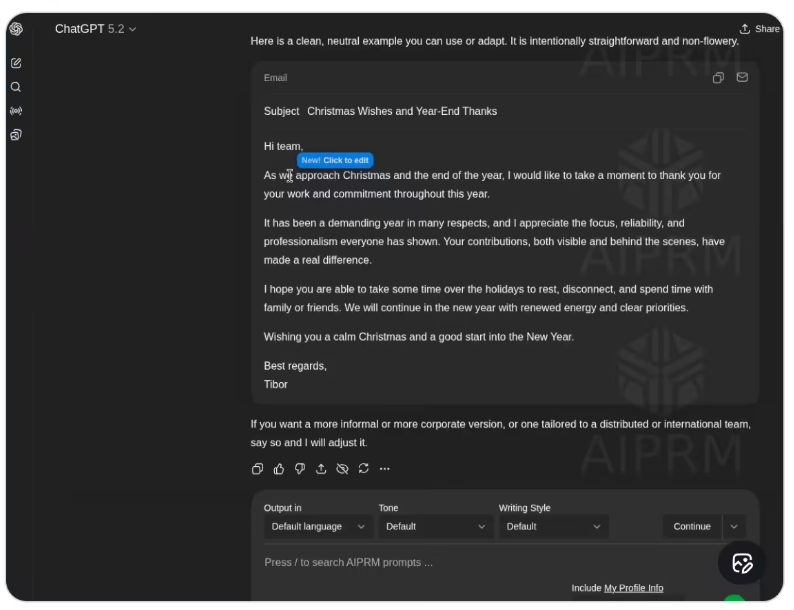
For anyone who's ever struggled with ChatGPT's plain text responses when drafting emails or articles, relief is here. OpenAI has stealthily introduced "Formatting Blocks," turning the familiar chat window into something resembling Microsoft Word.
Smart Editing That Knows What You Need
The magic happens through what AIbase describes as "interface adaptability." When ChatGPT senses you're working on documents—be it contracts, blog posts, or professional emails—the interface morphs into a rich text editor. Suddenly, your conversation feels more like collaborating on a shared document than exchanging messages.
Familiar Tools Right Where You Need Them
The real time-saver? Highlight any text and up pops a mini toolbar reminiscent of Word or Gmail. Want bold headings? Italicized quotes? These formatting options appear instantly without hunting through menus. It's the kind of intuitive design that makes you wonder why this wasn't always part of ChatGPT.
Currently rolling out in phases, this update hints at bigger plans. OpenAI reportedly intends to expand supported document formats soon—a clear signal that AI assistants are graduating from answering questions to handling serious work.
Why This Matters:
- ✍️ Context-aware editing: ChatGPT now recognizes writing tasks and adjusts its interface accordingly
- 🎨 Instant formatting: The floating toolbar brings familiar editing commands within easy reach
- ⏱️ Fewer app switches: Complete initial drafts without constant copying between programs