Apple Support App Gets Smarter: AI Assistant Graduates from Beta
Apple Steps Up Its Support Game
The familiar Apple Support app just got significantly more helpful. Version 5.12, rolling out now worldwide, represents Apple's strongest push yet into AI-powered customer service - and the technology appears ready for the spotlight.
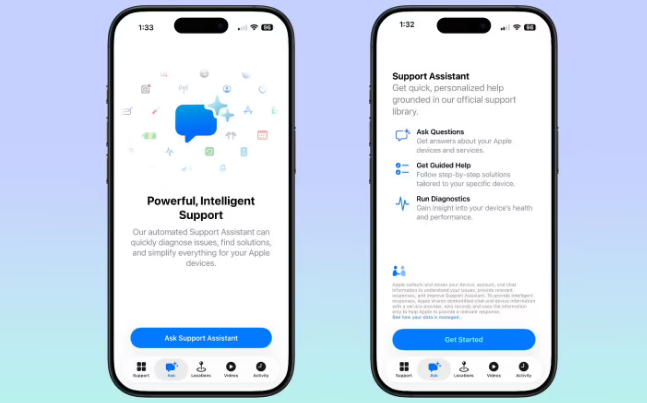
From Experiment to Essential Feature
Gone is the tentative 'Early Preview' label that previously accompanied the app's AI chat function. In its place stands a confident new 'Ask' tab with refreshed iconography - visual cues signaling this isn't your beta-test cousin anymore.
"The removal of testing labels suggests Apple's engineers have reached a comfort level with how the AI handles real-world problems," notes mobile tech analyst Rachel Tan. "When companies make these features permanent, it means they're seeing consistently positive user experiences."
The enhanced assistant now fields everything from billing questions to troubleshooting advice without requiring human intervention for routine matters. Early adopters report faster resolution times compared to traditional support channels.
DIY Diagnostics Come Home
Perhaps more immediately useful for average users: the new device performance diagnostic tool. Buried deep in system settings no more, comprehensive hardware checks now live directly within the Support app.
Want to check your iPhone's battery health before that big trip? Curious why your iPad feels sluggish? The app runs tests that previously required Genius Bar appointments or third-party utilities.
"This puts power back in users' hands," explains tech journalist Mark Chen. "Instead of wondering if they need to make time-consuming store visits, people can get answers immediately."
The diagnostics cover:
- Battery wear levels
- Storage performance metrics
- Memory utilization patterns
- Thermal throttling history
Subtle But Meaningful Refinements
The update isn't all about flashy new capabilities. Apple designers tweaked interface elements throughout the app:
- Smoother transitions between support topics
- More intuitive navigation hierarchies
- Redesigned icons that better represent their functions
The cumulative effect makes finding help feel less like digging through technical manuals and more like having a knowledgeable friend on speed dial.
Key Points:
- 🎓 AI Comes of Age: The former experimental chat feature graduates to permanent status as 'Ask'
- 🔍 Health Checks Simplified: New built-in diagnostics eliminate guesswork about device performance
- ✨ Polish Where It Counts: Thoughtful interface refinements improve the overall support experience