OpenAI's New Tool Makes AI Agent Debugging a Breeze
OpenAI Simplifies AI Debugging with Visual Tool
Debugging AI agents just got easier thanks to OpenAI's new open-source visualization tool called Euphony. Unlike traditional software debugging, AI agents present unique challenges with their multi-step processes involving file operations, API calls, and code generation. Traditional stack traces often fall short when trying to understand what's happening inside these complex systems.
Seeing the Conversation Clearly
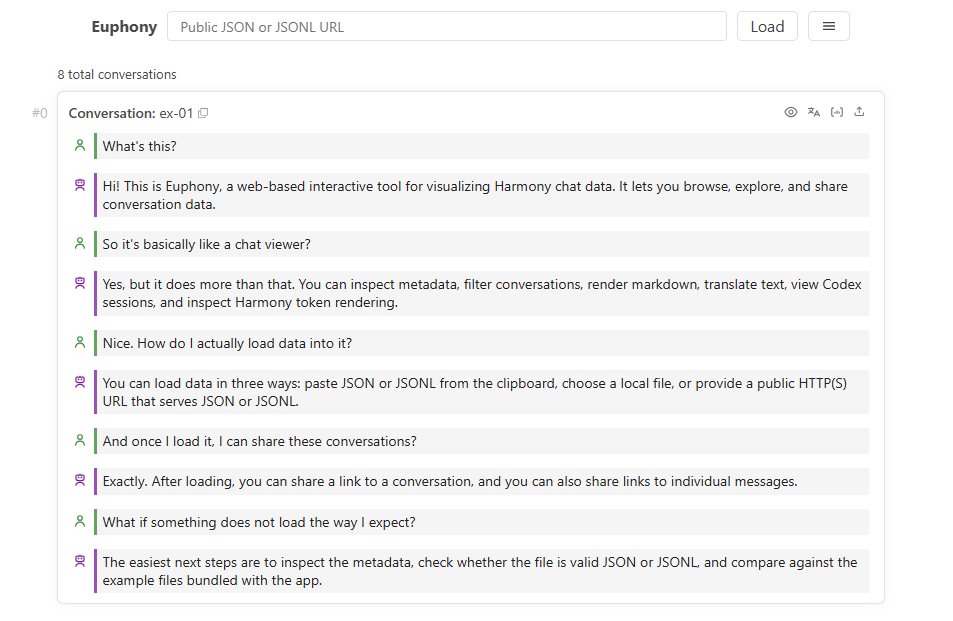
At its core, Euphony converts structured Harmony chat data and Codex session logs into an intuitive conversation view. Imagine being able to see every step of your AI agent's thought process laid out like a chat history - that's what Euphony delivers. The tool automatically recognizes different data formats whether you paste JSON directly, upload files, or provide a URL.
"What really sets Euphony apart is how it handles metadata," explains one developer who tested the tool early. "The inspection panel lets you dive deep into conversation details that would normally require digging through raw logs."
Powerful Features for Developers
The tool packs several useful features:
- Smart filtering using JMESPath queries to pinpoint specific information
- Focus mode for concentrating on particular conversation threads
- Grid view alternatives for different analysis perspectives
- In-browser editing capabilities that eliminate constant switching between tools
Developers working with annotated datasets will particularly appreciate how Euphony preserves and displays additional fields within its clean interface.
Flexible Deployment Options
Euphony offers two ways to run:
- Browser-only mode - Works entirely client-side with no server needed
- Server-assisted mode - Uses a FastAPI Python backend for handling larger datasets
This flexibility means teams can choose the setup that best fits their security requirements and performance needs.
The tool's component-based architecture makes it easy to integrate into existing workflows. "We built it as reusable web components," notes the OpenAI team, "so developers can customize the look and feel to match their projects."
Key Points:
- Visualizes complex AI agent workflows as clear conversation timelines
- Supports multiple input methods including direct paste and file uploads
- Provides detailed metadata inspection for deeper analysis
- Offers both client-side and server-assisted operation modes
- Built as customizable web components for easy integration