Microsoft's Smart Paste Gets Smarter with Local AI
Microsoft Revolutionizes Copy-Paste with Local AI
In a move that could change how we handle digital content, Microsoft has supercharged its clipboard functionality. The tech giant's newly enhanced "Advanced Paste" feature now processes text using artificial intelligence directly on your device - no cloud required.
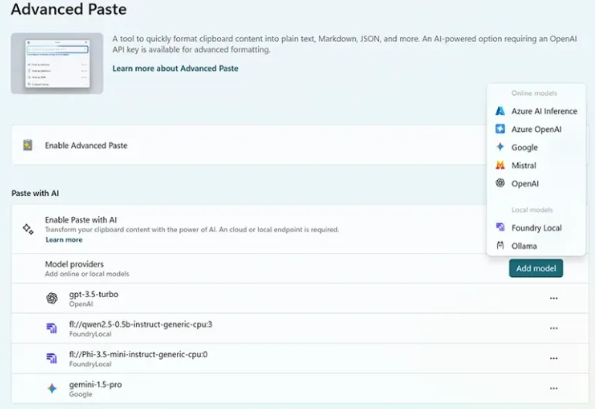
Why This Matters
Remember struggling to reformat copied text or extract key points from documents? Those frustrations might soon be history. By bringing AI processing local, Microsoft delivers three game-changing benefits:
- Privacy you can trust: Your sensitive documents never leave your device
- Instant results: No more waiting for cloud servers to respond
- Smarter workflows: The AI understands what you're trying to accomplish
"We're putting the power of AI directly in users' hands," explains a Microsoft spokesperson. "Whether you're compiling research or preparing presentations, Advanced Paste adapts to your needs."
Real-World Impact
The implications extend far beyond simple convenience:
- Educators can rapidly assemble teaching materials from multiple sources
- Students get help properly citing references and formatting papers
- Professionals spend less time wrestling with document conversions
The local processing advantage becomes clearest when working offline or with sensitive materials where cloud transmission poses security concerns.
Under the Hood
This upgrade represents Microsoft's continued push toward "edge computing" - performing complex tasks on local devices rather than distant servers. By optimizing their AI models to run efficiently on standard hardware, they've eliminated the performance trade-offs that previously forced reliance on cloud solutions.
The technology automatically recognizes what you've copied (Is it a table? A quotation? Raw data?) and suggests intelligent transformations. Need that PDF table in Excel format? Just paste smarter.
What's Next?
Microsoft hints this is just the beginning: "We see Advanced Paste evolving into an intelligent clipboard assistant that anticipates user needs." Future updates may include:
- Cross-language paste translations
- Automatic citation formatting
- Context-aware content adaptation
The feature rolls out first to Office 365 subscribers before potentially expanding to Windows system-wide.
Key Points:
- Local Processing Power: Your device handles all AI tasks without cloud dependency
- Workflow Revolution: Simplifies document-heavy tasks across education and business
- Privacy First Approach: Sensitive data stays securely on your machine
- Future Potential: Could fundamentally change how we interact with copied content