

Google's New Windows App Lets You Search Anything with Just Two Keystrokes
Google Brings AI-Powered Search to Windows Desktops
In a move that could make browser tabs obsolete for simple searches, Google has launched "Google app for desktop" for Windows users. The lightweight application, released April 15, puts the company's powerful Gemini AI just two keystrokes away.
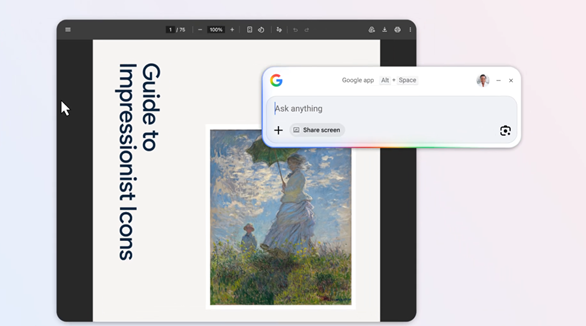
Instant Answers Without the Browser
Forget typing URLs or keeping Chrome running in the background. The app activates with Alt+Space, bringing up a search interface that feels more like conversing with a helpful assistant than using traditional search. "We wanted to remove the friction between questions and answers," a Google spokesperson told reporters. "Sometimes you just need information fast—not another tab."
What makes this different from the search bar in your browser? The app digs deeper, searching:
- Web pages and knowledge graphs
- Your local files and installed programs
- Documents stored in Google Drive
Smarter Tools for Everyday Tasks
The integration of Google Lens turns any visible content into a search opportunity. Stuck on a math problem in a PDF? Highlight it for step-by-step solutions. Need a restaurant menu translated? The app handles it without switching windows.
Power users will appreciate the screen sharing feature. Select any window—or your entire display—and ask questions directly about what's visible. Imagine getting coding help while keeping your IDE full-screen, or asking for spreadsheet formulas without minimizing your workbook.
Room to Grow
Currently limited to Windows 10+ systems with English interfaces, the app hints at bigger ambitions. Google confirmed development of a macOS version, potentially positioning it against standalone AI tools like ChatGPT Desktop. While early adopters praise its speed, some note the absence of:
- Local language support
- Advanced customization options
- Integration with non-Google cloud services
Key Points
- Lightning-fast access: Search anything with Alt+Space shortcut
- Beyond the web: Finds local files and apps alongside online results
- Visual search: Google Lens integration for images and on-screen content
- Productivity boost: Screen sharing lets you ask about visible content
- Windows-first: macOS version in development, no Chinese support yet
The launch signals Google's commitment to AI-first computing—where search evolves from something you do to something that happens seamlessly throughout your workflow. As the company races against OpenAI and Anthropic in the desktop AI space, users stand to benefit from these innovations that make technology feel more intuitive.