Figma Introduces AI-Powered Design Tools for Streamlined Editing

Figma Unveils AI Design Tools to Revolutionize Creative Workflows

Figma has officially rolled out its new AI-powered design and editing capabilities, marking a significant leap in streamlining the creative process. The update allows designers to modify designs using simple text prompts, eliminating the need for complex plugins or external software. Currently in a limited alpha phase, these features are accessible exclusively to users on paid plans.

Key Features of Figma's AI Update

The standout feature is the ability to select any layer or canvas and edit it via natural language commands. For example, users can input prompts like "adjust the layout to be responsive" or "change the color theme to dark blue." The AI then generates editable suggestions, including renaming layers, batch adjustments, image generation, or creating interactive prototypes. Image
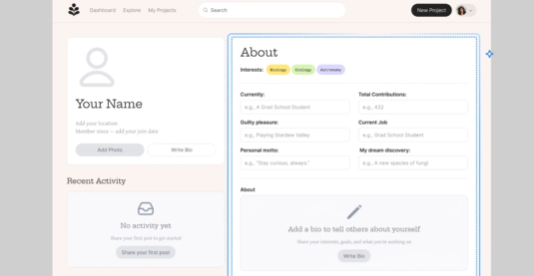
This innovation builds on Figma's Make tool, originally designed for generating app prototypes from prompts. Now upgraded to a general-purpose AI editor, it enables real-time collaboration with AI acting as a "virtual teammate." Tasks like background removal, text rewriting, or animation additions are automated, freeing designers to focus on core creative work.

Industry Impact: Lowering Barriers and Boosting Efficiency

The launch arrives as the design industry shifts toward an AI-first approach. Figma's tools not only reduce technical barriers—allowing non-professionals to participate—but also accelerate productivity. For instance:

  • Designers can rapidly test multiple interaction models.
  • Engineers can transition seamlessly to development using AI-generated code layers.

The update also includes image generation, enhanced vector editing, and responsive grid layouts—features previewed at Config2025. Future expansions may extend to FigJam whiteboards and Dev Mode.

Privacy and Future Developments

Figma emphasizes that its AI models rely on third-party open-source technology, ensuring no private user data is used for training. As feedback integrates into future updates, these tools could become standard in the design ecosystem.

Key Points:

  • Natural Language Editing: Modify designs via text prompts (e.g., "make this responsive").
  • Real-Time Collaboration: AI handles repetitive tasks while teams focus on creativity.
  • Limited Alpha Release: Available only to paying users during testing.
  • Privacy Assurance: No private data used for AI training.
  • Future Expansion: Plans to extend features to FigJam and Dev Mode.

Enjoyed this article?

Subscribe to our newsletter for the latest AI news, product reviews, and project recommendations delivered to your inbox weekly.

Weekly digestFree foreverUnsubscribe anytime

Related Articles

News

Kimi AI Goes Global: Overseas Earnings Overtake Domestic Market

Moonshot AI's latest K2.5 model is making waves internationally, with overseas revenue now surpassing domestic income for the first time. The upgraded AI system has seen its global paid user base quadruple, climbing to third place on Openrouter's popularity rankings. Key innovations like native multimodal architecture and 'Agent Swarm' technology are driving this expansion, transforming Kimi from a simple chatbot into a powerful productivity tool.

February 3, 2026
AI ExpansionMoonshot AIKimi K2.5
Baidu's ERNIE Bot 5.0 Breaks New Ground with Brain-Like AI Capabilities
News

Baidu's ERNIE Bot 5.0 Breaks New Ground with Brain-Like AI Capabilities

Baidu has unveiled its revolutionary ERNIE Bot 5.0, featuring native full-modal technology that mimics human cognition. Unlike competitors' patchwork approaches, this 2.4 trillion-parameter model processes text, images, video and audio simultaneously - enabling remarkable feats like generating working code from app tutorials and crafting literature in classical styles. The breakthrough could redefine how we interact with artificial intelligence.

January 22, 2026
Artificial IntelligenceMachine LearningNatural Language Processing
News

MongoDB's Voyage AI Lets You Chat with Databases Like Never Before

MongoDB's new Voyage AI model series is revolutionizing how we interact with databases. Instead of writing complex queries, developers can now simply ask for what they need in plain English. The upgrade brings smarter vector search, an AI assistant that understands natural language, and automatic data embedding - turning databases from passive storage into active problem-solvers. These changes could fundamentally reshape how businesses build AI applications.

January 16, 2026
Database TechnologyAI IntegrationNatural Language Processing
News

Claude AI Builds Its Own Assistant Tool in Just 10 Days

Anthropic's AI assistant Claude has achieved a remarkable feat - developing its own productivity tool called Claude Cowork in just ten days. Designed as a user-friendly alternative to coding-heavy AI tools, it helps non-technical users automate office tasks like file organization and report generation. While promising greater efficiency, Anthropic cautions users about potential risks like unintended file deletions.

January 15, 2026
AI DevelopmentProductivity ToolsAnthropic
Vercel's New Tool Lets AI Actually Use Websites Like Humans
News

Vercel's New Tool Lets AI Actually Use Websites Like Humans

Vercel has unveiled Agent Browser, a breakthrough tool that enables AI models to interact with websites just like people do. Unlike traditional automation tools, it requires zero setup and works seamlessly with popular AI assistants. This innovation could transform how we automate online tasks, from form filling to price comparisons.

January 13, 2026
AI AutomationWeb DevelopmentProductivity Tools
Tencent's WeDLM Turbocharges AI Reasoning With Diffusion Model Breakthrough
News

Tencent's WeDLM Turbocharges AI Reasoning With Diffusion Model Breakthrough

Tencent's WeChat AI team has unveiled WeDLM, a novel diffusion language model that dramatically speeds up text generation while maintaining quality. By cleverly blending diffusion models with attention mechanisms, this innovation delivers processing speeds up to 10 times faster than current models in certain tasks. Early tests show particular promise for applications requiring quick responses like customer service and real-time Q&A.

January 13, 2026
AI InnovationNatural Language ProcessingTencent Technologies