

Windows 11 Now Lets You Remove AI Features and Reclaim Storage Space
Microsoft Adds AI Uninstall Option in Windows 11
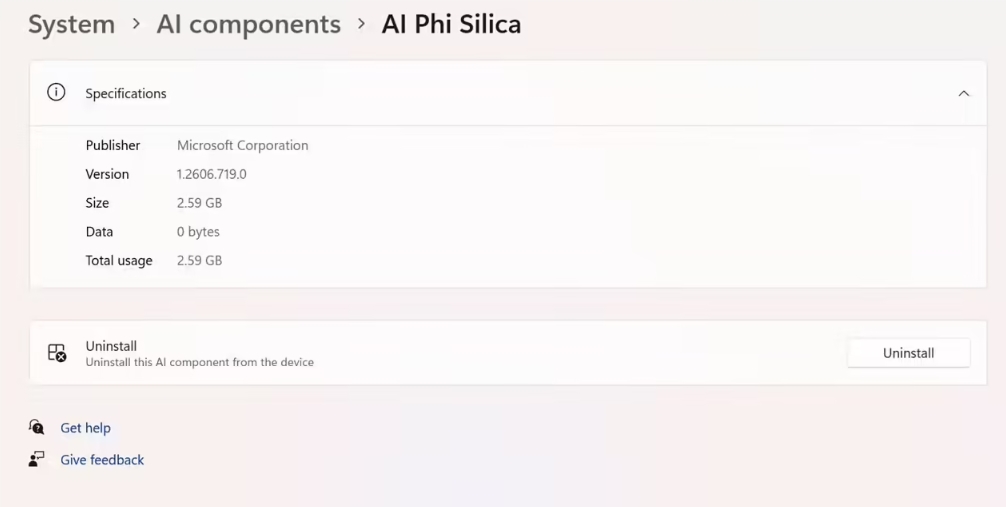
In a quiet update not mentioned in official release notes, Microsoft has given Windows 11 users the ability to remove built-in AI components. The new option appears in Settings for the latest Insider Preview build (version 26300.8553), letting users reclaim valuable storage space with just a few clicks.
Freeing Up Storage Space
The most space-hungry component is Microsoft's Phi Silica language model, which occupies a hefty 2.59GB. For users with smaller SSDs or those who don't use these AI features, this represents significant wasted space. The new uninstall option makes it simple to remove these components completely.
"This is exactly the kind of control users have been asking for," says tech analyst Mark Reynolds. "Not everyone needs or wants these AI features chewing up their storage."
Understanding Windows 11's AI Push
Since the 24H2 update, Microsoft has differentiated between regular PCs and "Copilot+ PCs" - devices with specialized hardware to run AI models locally. These systems require more memory and storage to handle features like text summarization and image editing.
Beyond Phi Silica, these AI-powered PCs include models for:
- Intelligent background removal in photos
- Automatic image enhancement
- On-device text processing
A Growing Industry Trend
Microsoft isn't alone in facing criticism over AI-related storage bloat. Google Chrome recently came under fire for silently downloading about 4GB of edge AI models, prompting some users to modify registry settings to stop the downloads.
"We're seeing a pattern across the industry," notes software engineer Lisa Chen. "Companies are eager to push AI features but haven't always considered the impact on users' devices."
What This Means for Users
The new uninstall option represents a shift toward giving users more control over their systems. While AI features can be powerful tools, not everyone needs them running locally. This change lets users tailor their Windows experience based on actual needs rather than corporate mandates.
Microsoft hasn't announced when this feature will reach stable builds, but it's expected to roll out in future updates as testing progresses.
Key Points:
- Windows 11 Insider builds now include hidden AI uninstall options
- Phi Silica language model alone uses 2.59GB of storage
- Part of Microsoft's broader push toward customizable AI features
- Addresses growing concerns about storage bloat from edge AI
- Expected to reach all users in future stable updates