

PowerPoint Gets Smarter: ChatGPT Plugin Transforms Slide Creation
AI Comes to PowerPoint: A Presentation Revolution
The days of staring at blank slides may soon be over. OpenAI just dropped a powerful new tool that brings ChatGPT's intelligence directly into Microsoft PowerPoint. This isn't just another AI gimmick - it's a fundamental shift in how we create presentations.
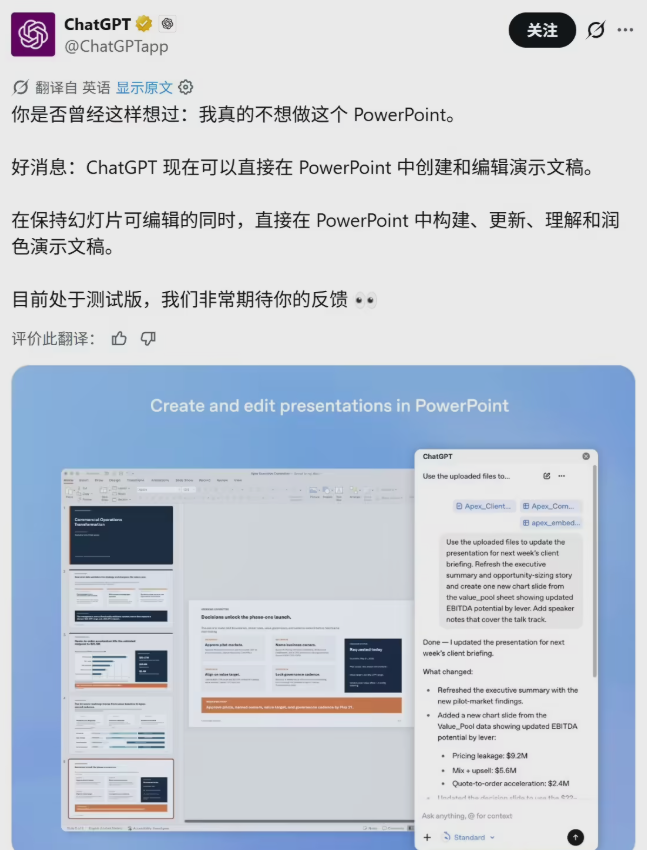
What Can It Do?
The plugin works like having a presentation expert sitting on your shoulder. Tell it "Create a 10-slide deck about renewable energy trends with a clean, modern design," and it will generate a complete first draft. Working on an existing presentation? Ask it to "make the financial data slides more visually engaging" or "tighten the wording on slide 7."
But here's where it gets really clever. The AI doesn't just follow orders - it thinks ahead. It might flag that your market analysis lacks competitor data or predict tough questions your audience might ask. Suddenly, your PowerPoint isn't just a slide maker; it's a presentation coach.
Keeping Humans in Control
OpenAI knows we're wary of AI running wild with our documents. That's why they've built in safeguards. Before making major changes, the tool always asks for confirmation. Want to completely restructure your deck? The AI will pause and get your approval first.
Why This Matters
This isn't just about saving time (though it does that remarkably well). It changes the creative process itself. Instead of wrestling with layouts and bullet points, you can focus on your core message while the AI handles the presentation mechanics.
The plugin works for both free and paid ChatGPT users, making it accessible to everyone. To try it, just head to PowerPoint's add-in store and search for ChatGPT.
Key Points:
- Instant Presentations: Generate complete slide decks from simple text prompts
- Smart Editing: Refine existing slides with natural language commands
- Content Coach: Identifies gaps in your presentation and suggests improvements
- Safety First: Requires user confirmation for major changes
- Universal Access: Available to all ChatGPT users, free and paid
As this tool rolls out, one question remains: How will we spend all that time we used to waste formatting slides?