Opera's new bridge brings AI chatbots to your browsing experience
Opera blurs the lines between browsers and AI assistants
In a move that signals where web browsing might be heading, Opera unveiled its Browser Connector feature this Thursday. Imagine having ChatGPT or Claude looking over your shoulder as you browse - that's essentially what this new tool enables, and it won't cost you a dime.
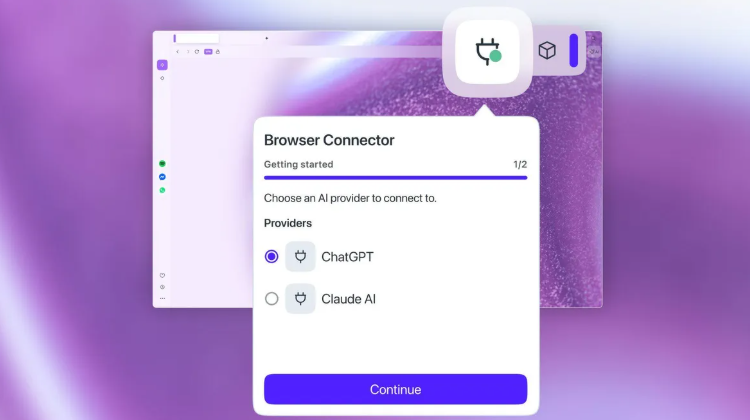
Built on Anthropic's Model Context Protocol (MCP), the connector creates a secure two-way street between your browser and various AI models. MCP isn't brand new - Opera's premium Neon browser got MCP support last month - but bringing it to mainstream browsers changes the game.
"We're tearing down the walls around AI ecosystems," explains Moahmed Salah, Opera's Senior Product Director. "Why be locked into one company's assistant when you can pick the perfect tool for each task?"
How it works (without the tech-speak)
Getting started is refreshingly simple:
- Search for "AI service" in your Opera settings
- Install the Browser Connector
- Connect to your preferred AI (currently ChatGPT or Claude)
Once set up, these AI helpers can actually understand what's on your screen - no more copying and pasting URLs. They'll serve up relevant information based on your active tabs, making research or shopping comparisons noticeably smoother.
Why this matters beyond tech circles
For regular internet users, this could mean:
- Quick fact-checks without leaving your article
- Instant product comparisons while shopping
- Writing assistance that understands your current webpage
Opera seems to be betting that the future of browsing isn't about choosing between browsers and AI tools, but finding clever ways to merge them. As AI becomes more woven into our digital lives, features like this might soon feel as essential as bookmarks or tabs once did.
Key Points:
- 🚀 Free Browser Connector brings AI assistants into Opera browsing
- 🔗 Works with ChatGPT and Claude via Anthropic's MCP protocol
- ⚡ Real-time context awareness from open tabs
- 🛠️ Simple setup - install once, use across supported AI services