

Firefox's Bold Refresh: One-Click AI Controls Take Center Stage
Firefox Reinvents Itself with Project Nova
Mozilla has pulled back the curtain on Project Nova, a comprehensive overhaul that reimagines Firefox from the ground up. Slated for gradual release later this year, this update delivers more than just a fresh coat of paint - it represents a philosophical shift in how browsers should handle AI integration and user privacy.
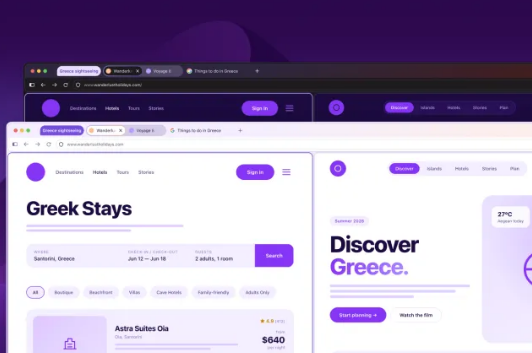
A Visual Transformation
Gone are the sharp corners and flat design elements. Project Nova embraces softer, rounded aesthetics with bubble-inspired tabs and toolbars that seem to float above the page. The new flame-themed color palette gives the browser more personality, while updated icons ensure seamless transitions between light and dark modes.
For users who prefer minimal interfaces, Mozilla is bringing back the fan-favorite Compact Mode, cleverly tucking away navigation controls to maximize screen real estate. The redesign also streamlines access to tab groups and vertical tabs - features that power users have been requesting for years.
AI on Your Terms
In what may be the most significant change, Mozilla is introducing a master switch for AI features in the revamped Settings page. "We believe users should decide when - or if - they want AI in their browsing experience," explains a Mozilla spokesperson. The toggle gives users complete control, preventing any AI models from downloading unless explicitly enabled.
This stands in stark contrast to competitors like Chrome, which recently faced backlash for automatically downloading nearly 4GB of AI models. Firefox's approach makes storage usage transparent, showing exactly which modules are installed and how much space they consume.
Beyond Aesthetics: Practical Upgrades
Project Nova isn't just about looks. The update coincides with Firefox 151, which introduces several functional improvements:
- Web Serial API: Now websites can directly interface with external devices for firmware updates or hardware control - no separate apps needed.
- Enhanced PDF Tools: Merge multiple PDFs right in the browser's built-in viewer.
- Customization Options: Fresh wallpapers and a redesigned homepage complete the makeover.
Key Points
- Complete visual overhaul with rounded design elements and new color scheme
- One-click AI disable gives users unprecedented control over privacy
- Compact Mode returns alongside improved tab management
- No surprise downloads - AI models only install when activated
- Firefox 151 adds PDF merging and direct device connectivity
Mozilla seems to be betting big on transparency and choice as differentiators in an increasingly AI-driven web. With Project Nova, they're not just updating their browser - they're reasserting their commitment to putting users first.