Doubao Coding Unveils Dual Modes for Enhanced Programming
Doubao Coding Launches Dual Modes for Enhanced Programming
Doubao Coding, a leading AI-powered programming platform, has rolled out a significant upgrade with the introduction of dual modes: Creation Mode and Q&A Mode. This update aims to provide users with a more flexible and efficient programming experience while lowering barriers for beginners.
Creation Mode: Streamlining Design to Deployment
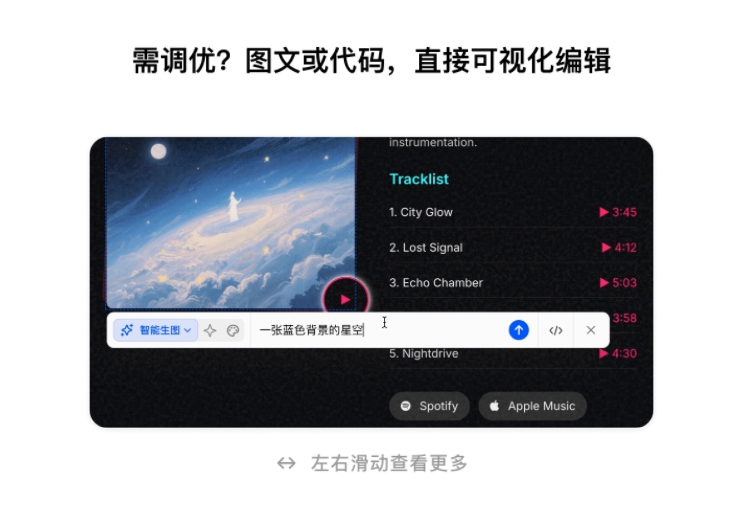
The new Creation Mode introduces innovative features such as reference image uploads and an interactive canvas tool. Users can now upload design references or sketch flowcharts directly on the canvas, and Doubao Coding's AI model will translate these inputs into functional code. This feature is particularly beneficial for non-technical users who can describe their needs through natural language or visual aids.
Key functionalities include:
- Inspiration templates tailored for multiple scenarios.
- Real-time previews and visual editing capabilities.
- Automated version control to track modification history.
Q&A Mode: Intelligent Debugging Assistance
The Q&A Mode focuses on professional programming support, offering:
- Technical question resolution.
- One-click code fixes and execution.
- Multi-attachment support for complex queries.
- An immersive code reader with word-select Q&A functionality.
When errors occur, the system automatically analyzes logs and suggests repairs—or even implements fixes directly—acting as an intelligent programming partner.
Versatile Use Cases
The upgrade expands Doubao Coding's applicability across diverse scenarios:
- Productivity Tools: Personal to-do lists, image compressors.
- Data Visualization: Dynamic charts from Excel data.
- Presentation Materials: Interactive web reports, auto-generated images.
- Responsive Websites: No-code development for beginners.
Users can access these features via Doubao's desktop or web versions, democratizing professional-grade coding capabilities.
Key Points:
- Doubao Coding’s dual modes cater to both creation and troubleshooting needs.
- Visual tools like canvas sketching lower entry barriers for non-programmers.
- Automated error analysis reduces debugging time significantly.