Comfy Cloud Beta Makes AI Art Creation Accessible to All
Comfy Cloud Beta Democratizes AI Art Creation
The world of AI-generated art just became significantly more accessible. Comfy Cloud, the official cloud platform for ComfyUI, has launched its public beta, removing traditional barriers to entry for Stable Diffusion creation.
Instant Access Without the Headaches
Gone are the days of wrestling with complex installations and hardware requirements. Comfy Cloud delivers a full-featured Stable Diffusion environment directly through your web browser. Whether you're using a Mac or a modest laptop, you can now tap into professional-grade AI visual tools without technical hurdles.
The platform comes pre-loaded with popular models including Stable Diffusion, SDXL, Flux, ControlNet, and LoRA. Users can dive straight into creating by simply dragging and dropping nodes to build workflows - no file management required.
Power That Surpasses Local Hardware
Behind the scenes, Comfy Cloud runs on high-performance GPU clusters capable of handling demanding tasks like rendering 5120×5120 pixel images or complex animation workflows. Independent tests show these cloud-based solutions actually outperform most consumer-grade local devices while maintaining an impressive output error rate below 1%.
This means students working on class projects and freelance designers building portfolios can now access computing power that previously required significant hardware investments.
Staying Connected to the Open-Source Community
Comfy Cloud maintains strong ties to its open-source roots. The platform automatically syncs with the latest ComfyUI community developments, including new nodes, interface updates, and security patches. Users benefit from:
- Pre-installed plugins like AnimateDiff for video generation
- IPAdapter for style transfers
- Comfyroll for workflow expansion
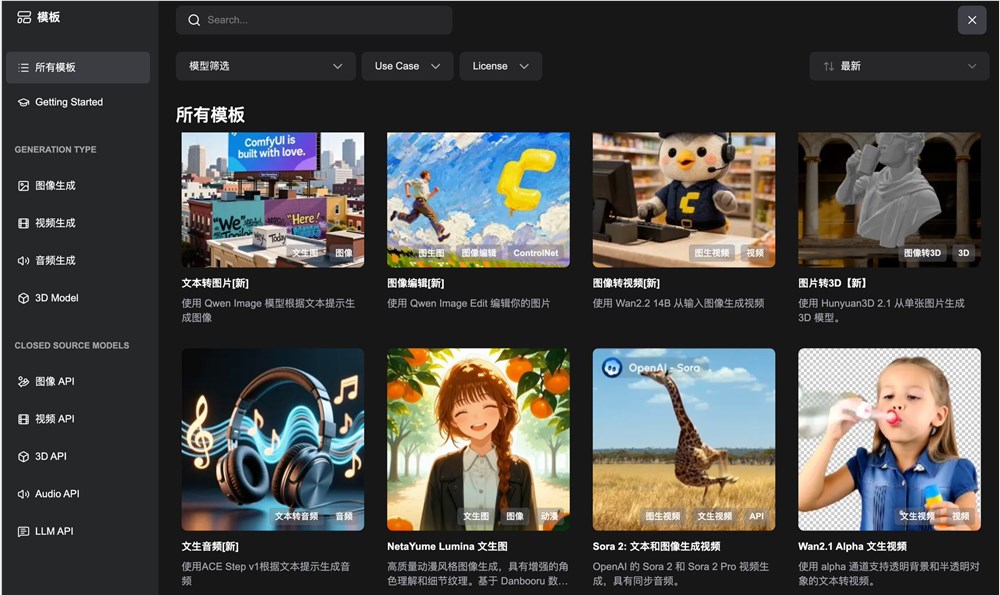
- Over 200 ready-to-use templates covering various creative scenarios
The collection significantly lowers the learning curve while providing immediate creative possibilities.
Flexible Pricing Model
The public beta introduces a fair usage policy:
- Daily GPU hour allocations
- Second-by-second billing only during active workflow execution
- Zero costs during editing or standby periods
The development roadmap includes exciting additions like team collaboration features, API access capabilities, and shared workflow links - making it easier than ever for creators to collaborate and share their processes.
The platform's developers also plan to implement a revenue-sharing model for custom node creators, incentivizing ongoing innovation within the community.
Key Points:
- Browser-based access eliminates installation headaches
- Cloud GPUs outperform most local machines
- Real-time sync with open-source developments
- 200+ templates provide instant creative starting points
- Pay-per-use model makes professional tools affordable