

OpenAI's ChatGPT plugin transforms PowerPoint into your AI presentation partner
OpenAI's ChatGPT Revolutionizes PowerPoint Creation
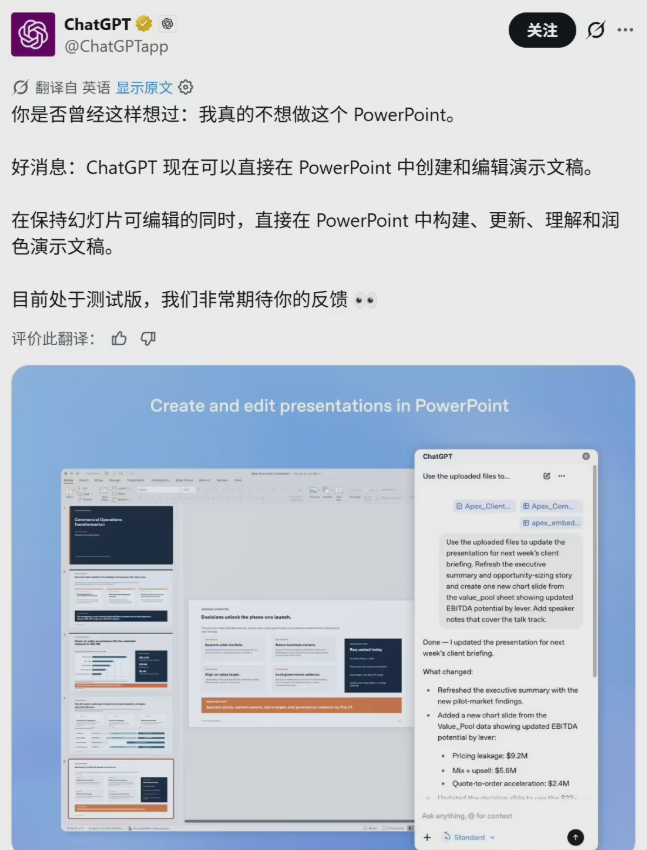
The days of staring at a blank PowerPoint slide may soon be over. OpenAI just dropped what could be the ultimate productivity hack for professionals: a ChatGPT plugin that lives inside PowerPoint and transforms how we create presentations.
Your AI Presentation Partner
Gone are the days of ChatGPT being just a chat window. The new plugin embeds directly into PowerPoint's core, acting like a digital presentation assistant that understands both content and design. Whether you're starting from scratch or polishing an existing deck, this tool promises to cut hours off your workflow.
Key features that stand out:
- Universal access: Available to both free and paid ChatGPT users
- Complete workflow support: From initial creation to final polish and expert review
- Safety controls: Critical changes require explicit human approval
Three Ways It Changes Everything
1. From Idea to Slides in Seconds
Imagine typing: "Create a 10-slide presentation on 2026 AI trends in a professional style" and watching as ChatGPT structures the outline, designs the layout, and populates the content—all before your coffee finishes brewing.
2. Real-Time Editing Assistant
Stuck on a particular slide? Tell ChatGPT exactly what you need: "Make the third slide's text more persuasive" or "Give these pages a modern color scheme." The AI handles the execution, saving you from tedious formatting adjustments.
3. Your Built-In Presentation Coach
Perhaps its most valuable feature is the ability to analyze your entire presentation like a seasoned professional would. It might flag: "Your market research lacks competitor analysis—that could weaken your proposal," or even anticipate tough questions your audience might ask.
Safety First Approach
OpenAI clearly learned from past AI mishaps. The plugin won't make major changes without your explicit approval—a crucial safeguard against unwanted surprises in important business documents.
What This Means for Professionals
This isn't just another AI tool—it represents a fundamental shift in how we create presentations. Instead of being the sole architect of every slide, professionals can now take on more of a directing role, guiding AI to handle the heavy lifting of structure, design, and even content refinement.
Ready to try it? Just visit PowerPoint's add-ins store, search for ChatGPT, and log in with your OpenAI account. The future of presentations just got a whole lot smarter.
Key Points:
- ChatGPT now integrates directly into PowerPoint as a plugin
- Generates complete presentations from simple text prompts
- Offers real-time editing and design suggestions
- Acts as a virtual presentation coach identifying weaknesses
- Requires human approval for major changes
- Available to all ChatGPT users (free and paid)